
Distribute Alternatives to Emailed Pitch Decks That Raise Founders Trust
Discover effective ways to distribute alternatives to emailed pitch decks that boost trust with investors. Engage and track interactions now!
August 18, 2026 · 9 min read

The best alternative to emailing a static PDF is a secure raise room: a hosted link that issues unique, investor-specific access, records per-slide engagement, and pings you the moment someone opens the deck. Set one up before your next outreach batch, not after.
Start now: upload your current deck, generate an investor-specific tracked link for each contact, set the room to view-only with an expiration date, and connect it to your CRM so opens create a task automatically.
- Emailing a PDF: no read receipts, no revocation, no idea who forwarded it internally.
- A shared Google Doc or Notion page: fine for a first pass, but weak on access control and analytics.
- A dedicated raise room: unique links per investor, per-slide dwell time, first-read alerts, and an audit trail if something leaks.
Pro Tip: Split your room into two access stages, a conviction stage with the deck and a one-pager, and a closing stage with cap table and financials, so early skimmers never see your full diligence file before they’ve earned it
Key Takeaways
Secure, analytics-driven raise rooms outperform emailed PDFs because per-slide engagement data turns silent “no response” outcomes into two distinct, actionable signals: never opened versus read and passed.
| Point | Details |
|---|---|
| Track per-slide engagement | Dwell time and completion rates reveal which slides hold attention and which get skimmed. |
| Stage access by conviction | Show deck and summary early, unlock cap table and financials only after real engagement. |
| Act on engagement bands | Sort investors into high, warm, and cold tiers and match outreach timing to each. |
| Pick per-raise pricing | Choose billing that ends when your round closes, not a permanent per-seat subscription. |
| Use BabyLoveRaise for raise rooms | Offers per-slide analytics, first-read alerts, measured watermarking, and an Operator tier for advisers. |
Table of Contents
- Why Distribute Alternatives Beat Emailing a Static PDF
- What Features Should a Raise Room Actually Have?
- How Do You Act on Engagement Data Once You Have It?
- What Goes Into a Raise-Ready Room, and How Long Does Setup Take?
- How BabyLoveRaise Approaches Raise-Room Distribution
- Try a Raise Room on Your Next Round
- Sources
Why Distribute Alternatives Beat Emailing a Static PDF
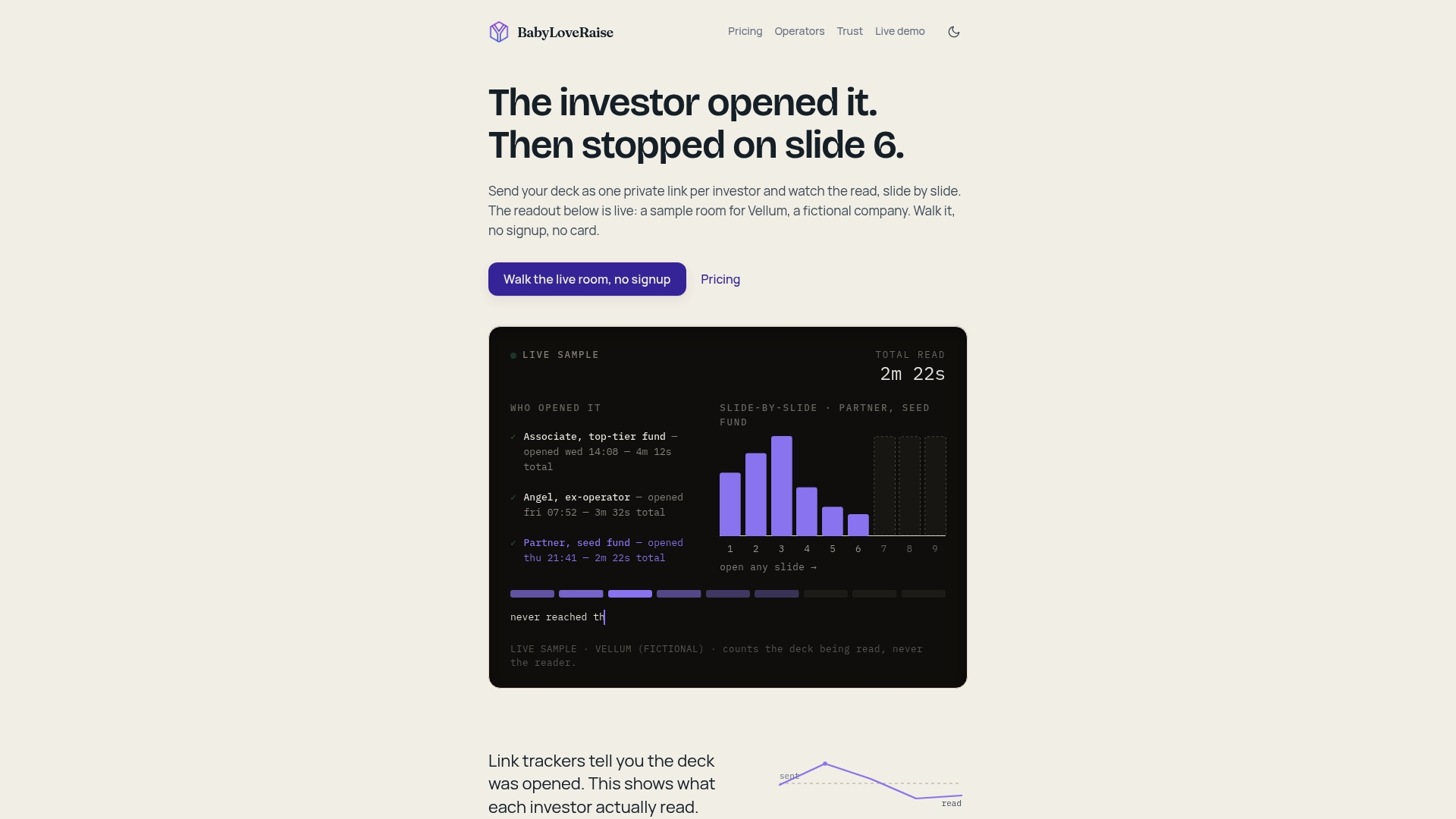
Per-slide dwell time and completion rate tell you something a “thanks, will review” email never will: whether an investor actually engaged or opened it once and forgot. First-read notifications matter because they arrive while your pitch is still fresh in that person’s inbox, not three weeks later when you’re guessing why they went quiet.
A tracked room typically surfaces:
- First open (and exactly when it happened)
- Time spent per slide
- Which slides got revisited
- Return visits days or weeks later
- Multiple viewers on one link (a signal the deck reached a partner meeting)
- Download or forward attempts
- A full audit log of who touched what, and when
Fundraising advisers increasingly treat this data as a replacement for guesswork, using dwell and completion patterns to decide who gets a warm follow-up and who gets nurtured. OpenVC’s tracking model shows the same logic in practice: knowing exactly where attention dropped off turns a vague “no response” into a specific edit to slide 7.
Security has to travel with the analytics, not sit separately from it. Platforms built for this pair engagement data with dynamic watermarking, download controls, and return-visit tracking, so a leaked screenshot traces back to a specific viewer instead of vanishing into the void.
Pro Tip: Give everyone conviction-stage access first (deck plus summary), and only unlock the closing room, cap table, SAFEs, financial model, once someone has read past slide 10 or booked a second call. Access itself becomes a signal of how serious they are.
What Features Should a Raise Room Actually Have?
Not every tool marketed as a “data room” was built for a fundraise. Before you commit, check for these specifics.
- Unique, authenticated links per investor. No shared PDF, no generic “here’s the deck” link that three people forward around a firm.
- Per-slide engagement analytics: dwell time, completion, and revisit patterns, exportable for your own investor tracking sheet.
- Access controls that include view-only mode, link expiration, remote revocation, disabled downloads, and measured watermarking on anything that can be saved.
- Staged permission tiers so you can separate conviction materials from closing diligence, plus an operator or white-label console if you’re an adviser running several client raises at once.
- Two-way CRM sync, plus calendar or email triggers that fire off a task the moment someone opens the room.
- Pricing that flexes to a single raise instead of locking you into a permanent per-seat subscription, with transparent add-on pricing if you want editorial help.
- Reasonable mobile and offline viewing behavior. Investors read decks on phones between meetings more often than founders assume.
- A real onboarding process, responsive support, and optional concierge services like a deck editorial pass or a narrative Build Map if you want outside eyes on the story.
Pro Tip: If you’re pre-seed with a handful of warm intros, a well-organized Notion page or Google Drive folder with expiring links is enough to start. The moment you’re sending to more than a dozen investors, or you catch yourself refreshing your inbox wondering who opened what, that’s the signal to move to a purpose-built room, a pattern CRV also flags as the natural upgrade point.
How Do You Act on Engagement Data Once You Have It?
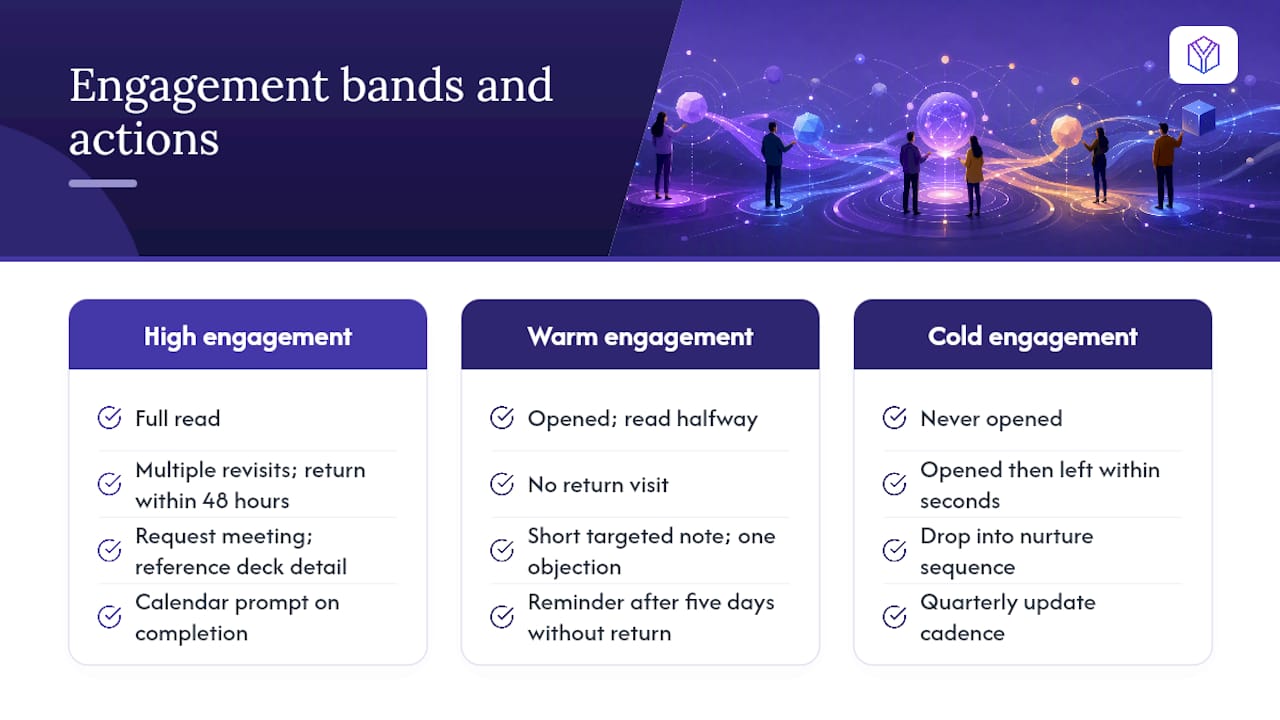
Sort investors into three bands the moment engagement data starts coming in, and let the band dictate your next move.
High engagement (full read, multiple slides revisited, a return visit within 48 hours): request a meeting directly, referencing something specific from the deck. Warm (opened, read halfway, no return visit): send a short, targeted note addressing one likely objection, maybe the slide where attention dropped. Cold (never opened, or opened and left within seconds): drop into a nurture sequence, a quarterly update, not a hard pitch.
Per-slide dwell is the real diagnostic tool here. If half your investors are speeding past the market-size slide, that slide isn’t doing its job, reorder it, cut the fluff, or replace the estimate with a bottom-up number. If they’re stalling on your metrics slide, try clarifying the chart or adding a one-line takeaway above it.
You can test this directly: send two slightly different versions of a weak slide to two investor segments using separate tracked links, then compare completion rates. It’s a small, fast way to know if the fix worked before your next batch of outreach.
Automate the busywork. Set a CRM trigger on first open, a reminder sequence if someone hasn’t returned within five days of an initial read, and a calendar prompt the moment someone finishes the full deck.
Pro Tip: Completion rate alone can mislead you. Someone who reads every slide once and never returns likely passed. Someone who reads it, leaves, and comes back three times in a week is still deciding, treat that differently and follow up faster.
What Goes Into a Raise-Ready Room, and How Long Does Setup Take?
Your room needs, at minimum: the pitch deck, a one-page executive summary, a key metrics snapshot, your cap table, incorporation documents, any SAFEs or convertible notes, a basic financial model, customer case studies if you have them, and a product demo or short walkthrough video. Andreessen Horowitz’s guidance on data rooms](https://a16z.com/the-insiders-guide-to-data-rooms-what-to-know-before-you-raise/) lists this same core set as the baseline investors expect at seed, and CRV recommends keeping the deck itself to 10 to 15 slides regardless of how much backup material sits behind it.
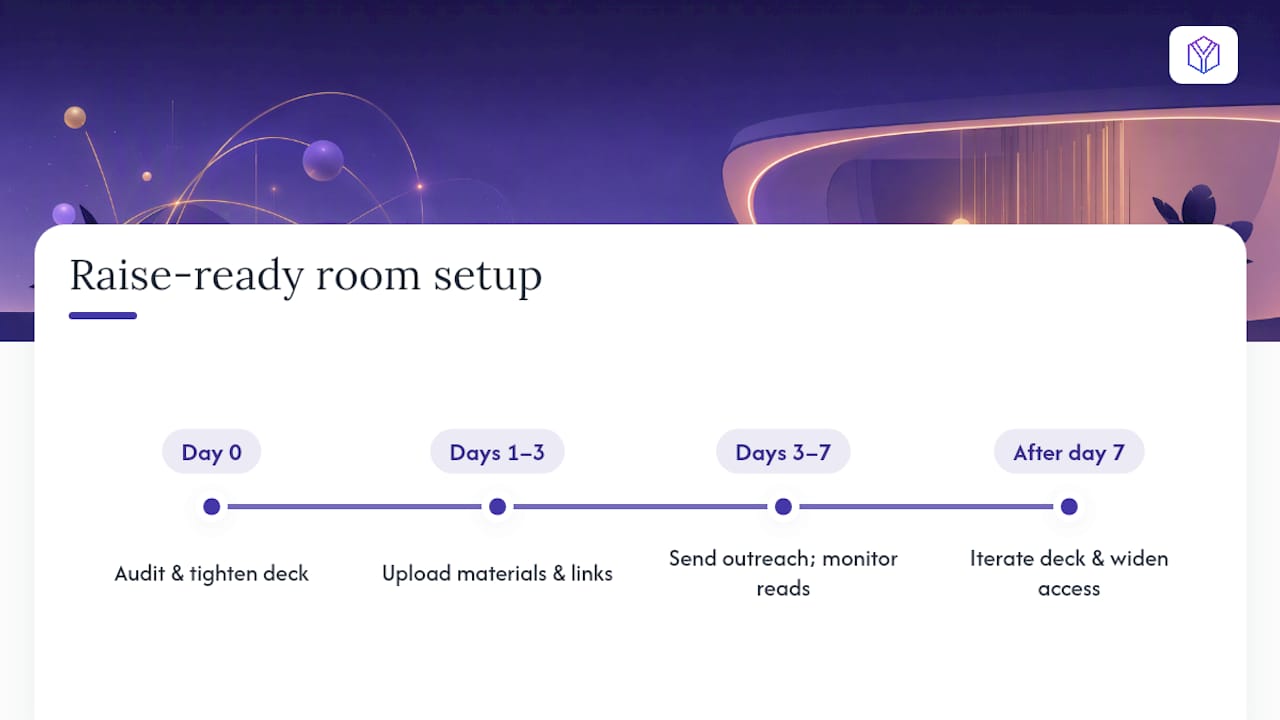
A realistic timeline looks like this: day zero, audit and tighten the deck; days one through three, upload materials and generate investor-specific links; days three through seven, send initial outreach while watching first-read data closely; after that, iterate the deck and widen access as conversations progress.
On pricing, expect three shapes: free or basic tools with minimal tracking, per-seat subscriptions that keep billing you long after the raise closes, and per-raise pricing that ends when your round does. Advisers running multiple client raises tend to find an Operator or white-label tier cheaper per client than stacking individual seat licenses. Check that whatever you pick can export audit logs and supports basic GDPR and CCPA-aware access controls, since investor data and founder financials both carry real privacy weight. Budget a day or two for onboarding; a concierge editorial pass, if you use one, typically adds another few days before your first send.
How BabyLoveRaise Approaches Raise-Room Distribution
BabyLoveRaise builds the raise room around the fundraise itself, not around generic file sharing. Every deck lives in a hosted room with per-slide analytics, first-read notifications, and pricing tied to the raise rather than a permanent seat count.
- Unique investor-specific links, no shared PDFs
- Per-slide dwell and completion metrics on an owner dashboard
- Measured watermarking on any downloadable material
- Staged access between conviction and closing materials
- CRM integration for automated follow-up triggers
- An Operator tier letting advisers and fractional CFOs run branded rooms across multiple client raises
For advisers, the Operator tier changes the math: instead of paying per seat across every client relationship, you run one white-label console across all of them, which typically undercuts standard virtual-data-room pricing by a wide margin. Founders who want narrative help beyond the tracking layer can add a concierge editorial pass or a Build Map session.
Pro Tip: Start a seed raise with the deck and summary open at conviction level, keep the cap table and financial model locked, and unlock them only for investors who’ve read past your traction slide.
An Adviser’s Take on Reading the Signals
Most founders check analytics like a scoreboard. That’s backwards. The number that matters isn’t opens, it’s what happens in the hour after a first read.
- Operator consoles let advisers watch first-reads across every client raise at once, so a founder gets a heads-up call within minutes, not days.
- A single slide revisit, especially on the metrics page, is worth more than three polite “looks interesting” emails.
- Confidentiality has to scale with conviction: hold financial detail back until someone has shown real, repeated engagement, not just curiosity.
The founders who raise fastest treat every open as new information, not a vanity metric.
Try a Raise Room on Your Next Round
BabyLoveRaise is built specifically for the fundraise itself, priced per raise instead of locking you into a permanent seat subscription that outlives your closing. That’s the practical difference between this and a generic file-sharing tool: you stop paying once your round wraps, and you get engagement data built around investor behavior, not generic document views.
Getting started takes less time than writing a decent cold email:
- Pick your current deck and upload it
- Create a unique, tracked link for each investor on your list
- Set view-only access with an expiration date
- Turn on first-read alerts
- Connect the room to your CRM so opens generate follow-up tasks automatically
Per-raise pricing covers most seed rounds outright, and the Operator tier is worth a look if you’re an adviser or fractional CFO juggling more than one client raise. Founders who want a second set of eyes on the narrative can add a concierge editorial pass before the first send. Check the feature and pricing details and get your first raise room live before your next round of outreach.
Sources
- CRV — Data room setup
- OpenVC — Share Your Startup Pitch Deck & Track Investor Engagement
- VeryDRM — How to Know If an Investor Opened Your Pitch Deck (And What to Do Next)