
Pitch Deck Version Control: A Founder's Practical Guide
Streamline your pitch deck version control with one master file, a single link, and clear changelogs to impress investors effortlessly.
August 11, 2026 · 14 min read

Stop sending PDFs. Right now, your canonical deck should live in one hosted location, owned by one person, named with a convention like CompanyName_InvestorDeck_20260115_v3. Publish a single share link, restrict edit rights to the master file, and open a changelog entry for the version you’re about to send. That’s the whole system in 30 seconds.
- Designate the master: One file, one location (Google Slides, Figma, or a hosted raise room), one named owner with edit rights.
- Publish one canonical link: Investors click the same URL every time. When you update the deck, the link updates automatically. No new emails, no “please use this version instead.”
- Start the changelog now: Date, version number, what changed, who approved it. One row per turn.
- Notify recipients: A two-line message confirming the canonical link is live and what changed in this version.
Pro Tip: Before you send anything externally, confirm the share link points to the master, not a local export you forgot to update. That single check prevents most version drift.
Key Takeaways
Effective pitch deck version control comes down to one master file, one canonical link, and a changelog entry for every turn. Here’s what to do in the next 24 hours.
| Point | Details |
|---|---|
| Lock the master now | Assign one owner with edit rights and move all other team members to view or comment access only. |
| Publish a canonical link | Use a hosted raise room or a permanent share URL so investors always see the latest version without a new email. |
| Start the changelog | Log today’s version with date, owner, what changed, and which metrics were updated. |
| Run a model-deck check | Cross-reference your three or four headline metrics between the financial model and the deck before the next send. |
| BabyLoveRaise raise room | Provides a hosted canonical link, per-slide analytics, and a permanent archive when the raise closes. |
Table of Contents
- Why does poor pitch deck version control cost you investor trust?
- Core rules every fundraising team should enforce
- How to run pitch deck version control during an active raise
- Which tool patterns actually solve version control for decks?
- What sharing settings actually protect your deck?
- How do you keep the deck and the financial model in sync?
- Practical templates and a feedback workflow you can copy today
- How do you tailor decks for specific investors without fragmenting the master?
- The version control habit that actually signals operational maturity
- BabyLoveRaise runs the raise room so you don’t have to build one
- Sources
Why does poor pitch deck version control cost you investor trust?
The damage from sloppy version management rarely announces itself. An investor pulls up the deck you sent three weeks ago, sees a revenue figure that contradicts what you mentioned on the call, and quietly moves on. You never find out which slide killed the conversation. Treating the deck as a system — one master source, restricted edits, a defined approval flow — is what prevents that silent fragmentation.
The operational costs compound fast:
- Duplicated work: Two teammates update different copies of the same slide, then spend an hour reconciling.
- Confused presenters: A co-founder walks into a meeting with v4 while the deck on the investor’s screen is v2.
- Follow-up friction: You can’t tell whether an investor went cold because they never opened the deck or because they read every slide and passed. Without a canonical link, you can’t track either state.
The upside of a controlled workflow is just as concrete. Faster follow-ups, because you know who read what. Cleaner due diligence, because your numbers are consistent across every touchpoint. Confident presenters, because everyone is working from the same file.
Per-slide analytics turn the two silences that look identical (“never opened it” vs. “read everything and passed”) into two different, actionable states. That distinction alone is worth building a proper version-control workflow around.
Core rules every fundraising team should enforce
Keeping a single source file as the authoritative version and exporting only after it’s approved is the foundation of every reliable deck workflow. These rules operationalize that principle:
-
Single source of truth. One master file. One owner with edit rights. Everyone else gets view or comment access only.
-
Consistent naming convention. Use
Audience_Purpose_YYYYMMDD_vXplus a short human tag:SeriesA_InvestorDeck_20260115_v3_TigerLead. The human tag makes rollback fast when you need to find the version a specific investor saw. -
Mandatory changelog. Every turn gets a row: date, version ID, owner, what changed, which metrics were updated, and who approved. No exceptions.
-
Separate internal drafts from external decks. Internal working files live in a
/draftsfolder. The investor-facing master lives in/live. Public teasers are a third category entirely. -
Derived copies trace back to the master. When you create a tailored version for a specific investor, record the parent version in the filename and in the changelog.
TigerLead_Teaser_20260115_v3-parentis unambiguous. -
Approval before export. No PDF leaves the building without a sign-off from the deck owner.
Pro Tip: Run a five-point pre-export checklist before any external send: (1) numbers match the model, (2) no placeholder text, (3) fonts embedded, (4) share link points to the master, (5) changelog updated. Tape it to your monitor if you have to.
How to run pitch deck version control during an active raise
A raise is a sequence of turns. Each turn has the same shape: update, check, publish, notify. Here’s the sequence that keeps the master clean.
- Freeze the master. Before editing, note the current version in the changelog as “in progress.” This prevents a teammate from exporting the half-updated file.
- Open an iteration branch. Work in a private draft or a named copy (
_DRAFT_20260115). Never edit the live master directly. - Update numbers from the source model. Pull figures from the financial model, not from memory or a prior slide. Linked charts refresh automatically; hardcoded numbers need a manual check.
- Run integrity checks. Scan for broken links, hardcoded values that should be formula-driven, and formatting drift. Automated QC tools can catch these in seconds.
- Update the changelog. Record what changed, which slides were affected, and who approved the update.
- Create exports. Generate the investor PDF or update the hosted canonical link. The canonical link should update automatically so recipients always see the newest version without a new URL.
- Pre-send QC. Narrative cohesion (does the story still hold?), numbers (do they match the model?), assets (fonts, images, embedded links). A polished export takes five minutes to check and saves an embarrassing correction email.
- Publish. Confirm the canonical link is live and pointing to the new version. Record the version ID in the changelog.
- Notify. Send a standardized two-line update to investors, advisors, and any BD contacts who have the link. State the version number and the one or two things that changed.
- Rollback protocol. If something is wrong post-send, revert the master to the prior version, update the canonical link, and send a brief correction note. The changelog entry for the bad version stays — you want the audit trail.
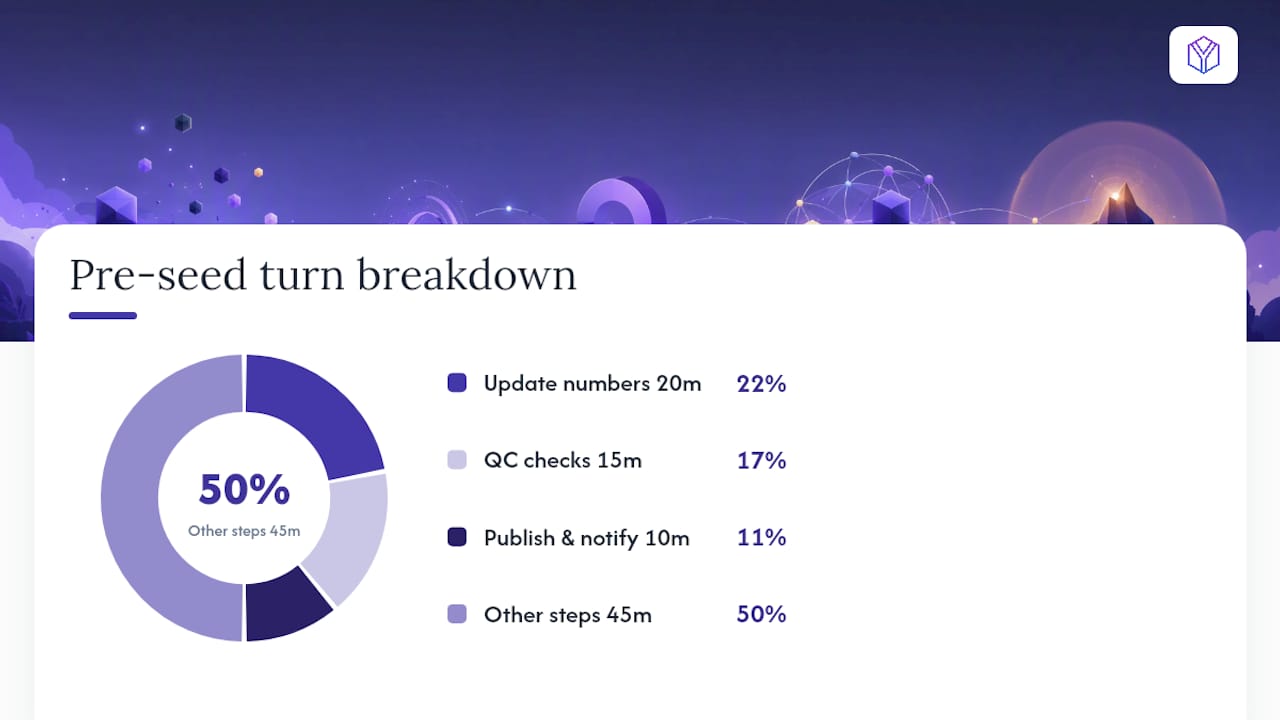
A typical pre-seed turn runs about 90 minutes from freeze to notify: 20 minutes updating numbers, 15 minutes on QC, 10 minutes publishing and notifying. Budget accordingly.
AI-assisted drafting tools can speed slide iterations, but they increase the need for a strict source-of-truth process. Any AI-generated content needs to be reconciled back into the master before it’s treated as canonical.
Which tool patterns actually solve version control for decks?
No single tool does everything. The right setup combines a few functional patterns, each solving a specific job. Tool roundups for pitch-deck software are useful for mapping capabilities to needs rather than evaluating vendors in isolation. Here’s how the categories break down:
- Raise-room / canonical link providers. The primary job: publish one URL that always serves the latest export. When you update the deck, the link updates automatically. Recipients never need a new file. These platforms also handle per-slide engagement tracking, access controls, and download permissions. Visible.vc demonstrates this pattern: upload a new version and the public URL reflects it immediately.
- Cloud storage with version history. Google Drive, Dropbox, and similar tools keep immutable version snapshots and support rollback. They work well as the master file repository when paired with a separate sharing layer. The limitation: sharing a Drive link gives recipients access to the file’s edit history, which is rarely what you want.
- Changelog and feedback trackers. A Notion template built for investor pitch deck version control centralizes feedback, records approvals, and tracks which investor received which version. This replaces scattered email threads with a single structured record. A compact tracker reduces the time between “feedback received” and “update approved.”
- QC automation and deck-model checks. Tools like Macabacus scan presentations and financial models for formatting drift, hardcoded values, and formula errors before a version is published. The primary job: catch the errors that manual review misses at 11 PM before a morning send.
- Integration patterns. Link your slide charts directly to the financial model (Google Sheets to Google Slides, Excel to PowerPoint). Define a refresh policy: who triggers the refresh, when, and who verifies the output. Open-source projects like PitchDeckUploader demonstrate the minimal viable architecture: store the source, maintain version history, publish an immutable export link.
The combination that works for most pre-seed and seed raises: a hosted raise room for the canonical link and analytics, cloud storage for the master file and rollback history, and a Notion tracker for changelogs and feedback.
What sharing settings actually protect your deck?
Access controls are where most founders under-invest. The goal is low friction for investors and high control for you.
- View-only by default. Investors should never have edit access to the canonical link. View-only with optional download is the right starting point.
- Password protection for sensitive rounds. A password adds one layer for early-stage decks with detailed financial projections. Keep the password short and share it in a separate message from the link.
- Domain restriction for warm intros. Restricting access to a specific email domain (e.g.,
@tigerglobal.com) works well when you’re sharing with a specific firm and want to prevent forwarding outside it. - Link expiration for cold outreach. Short-lived links for cold sends limit exposure if the email lands in the wrong inbox. Use a permanent canonical link for ongoing investor relations once a conversation is active.
- Download and watermark controls. Allow downloads only when an investor explicitly requests a file for their records. When you do allow downloads, a measured watermark (investor name, date) creates accountability without being hostile. For most sends, view-only enforced in the browser is sufficient.
- Reduce the editor set to 1–2 people. Broader team members get comment rights, not edit rights. This single rule prevents most accidental overwrites.
- Audit trail and per-slide engagement. Viewer logs tell you who opened the deck and when. Per-slide dwell data tells you which slides held attention and which got skipped. That data informs your follow-up sequence directly. Ethical tracking reports on the document, not the person.
Pro Tip: Use short-lived deep links for cold outreach and a permanent canonical link for investors already in conversation. The cold link limits exposure; the canonical link keeps your active pipeline on the same version without any re-sends.
Presentation platforms that support expiring links and embedded analytics give you both controls in one place.
How do you keep the deck and the financial model in sync?
The model is the source of truth for every number in the deck. The deck is a display layer. When that relationship breaks, you get slides with figures that contradict the model, and investors notice.
- Define a refresh policy. Decide who triggers the model-to-deck refresh, when (before every external send, at minimum), and who signs off on the output. Write it in the changelog template.
- Link charts and tables directly where possible. Google Slides linked to Google Sheets, or PowerPoint linked to Excel, refresh automatically when the source data changes. This eliminates the most common source of hardcoded drift.
- Run a pre-export model integrity check. Before any publish, scan for: hardcoded values that should be formula-driven, broken cell references, and formula errors. QC automation tools handle this in seconds. Manual checks work too, but they’re slower and miss more.
- Flag affected slides in the changelog. When a metric changes, note which slides display that metric. The reviewer knows exactly where to look.
- Final audit before publish. Cross-reference the three or four headline metrics (ARR, burn rate, runway, unit economics) between the model output and the deck. These are the numbers investors will ask about on the call.
A quick mid-turn check (steps 3 and 4) takes about ten minutes. The final audit (step 5) adds another five. That 15-minute investment prevents the kind of number inconsistency that quietly ends a conversation.
Practical templates and a feedback workflow you can copy today
The fastest way to operationalize version control is to start with a template rather than build one from scratch.
Changelog template fields (copy this into Notion or a spreadsheet):
- Version ID (
v3.1) - Date
- Owner (who made the change)
- Summary of changes (one sentence)
- Metrics updated (list affected KPIs)
- Parent version (for derived copies)
- Approved by
Feedback intake workflow:
- All comments go into the central tracker, not email threads. A Notion feedback tracker is purpose-built for this.
- The deck owner reviews comments in a scheduled batch (weekly during an active raise, not in real time).
- Approved changes get a changelog entry before touching the master.
Sample investor update email (two variants):
Variant A — investor who opened the prior version:
Hi [Name], quick note: I’ve updated the deck with our January metrics (ARR now $X, runway extended to 18 months). The canonical link is the same: [link]. Slide 7 has the updated financials. Happy to walk through the changes on a call.
Variant B — cold lead who hasn’t opened yet:
Hi [Name], sharing our latest deck (v4, updated January 2026). One link: [link]. We’ve added a customer traction slide since we last connected. Let me know if you’d like 20 minutes.
A compact case example: A founder updates the ARR figure in the model, triggers a chart refresh in Google Slides, runs a five-point QC check, updates the canonical link in the raise room, and logs the change in the Notion tracker. The per-slide analytics from the prior version showed investors were dropping off at slide 8 (the financials). The founder restructures that slide in this turn. Two days later, the analytics show investors are now reading through to slide 10. That’s the feedback loop working.
Pro Tip: If you use AI tools to draft new slides or iterate on copy, reconcile every AI-generated change back into the master before treating it as canonical. AI outputs are drafts, not versions.
A Figma-first workflow applies the same logic at the design layer. Keep one source file, export to PDF or PowerPoint only after the source is approved.
How do you tailor decks for specific investors without fragmenting the master?
Tailoring is legitimate. Sending a different version of your core narrative to every investor is not. The line between them is traceability.
- Always branch from the master. Never start a tailored version from a prior tailored version. The parent is always the current master, and the filename records it:
TigerLead_Teaser_20260120_v3-parent. - Limit tailoring to the appendix. Core metrics, the narrative arc, and the problem/solution framing stay identical across all versions. Investor-specific material (a relevant portfolio company reference, a market size cut relevant to their thesis) belongs in a dedicated appendix, not woven into the main slides.
- Record the distribution. Log which investor received which variant, the version ID, and the date. This matters for due diligence and for rollback if you need to correct a specific send.
- Small, reversible customizations only. Swapping a case study, adding a relevant market stat, or adjusting the appendix order are safe changes. Rewriting the business model slide for a specific investor is a risky deep rewrite that creates reconciliation debt.
Dos:
- Add an investor-specific cover slide or appendix section.
- Reference a portfolio company they’ve backed in a comparable space.
- Adjust the market size framing to match their stated thesis.
Don’ts:
- Change core financial metrics between versions.
- Rewrite the problem or solution slide without syncing the master.
- Create more than three or four active tailored variants at once.
Pro Tip: Build one appendix of investor-specific slides and pull from it rather than creating multiple full-deck variants. A 15-slide master plus a 5-slide modular appendix beats five separate 15-slide decks every time.
The version control habit that actually signals operational maturity
Most founders treat deck drift as a presentation problem. It’s an operations problem. The investor reading your deck is simultaneously evaluating the business and the team running it. A deck with inconsistent numbers, stale slides, or a “please use this version” correction email signals that the team hasn’t yet built the habits that scale.
The founders who get this right early aren’t necessarily more organized by nature. They’ve just decided that the deck is a system, not a document. That shift in framing changes everything: who owns it, how changes get approved, and what happens when something goes wrong. BabyLoveRaise is built around exactly that workflow, giving founders a hosted raise room where the canonical link, the analytics, and the version history all live in one place.
BabyLoveRaise runs the raise room so you don’t have to build one
Every workflow in this guide requires one thing: a canonical link that always serves the latest version and tells you who’s reading it. BabyLoveRaise is that raise room, built specifically for pre-seed and seed founders.
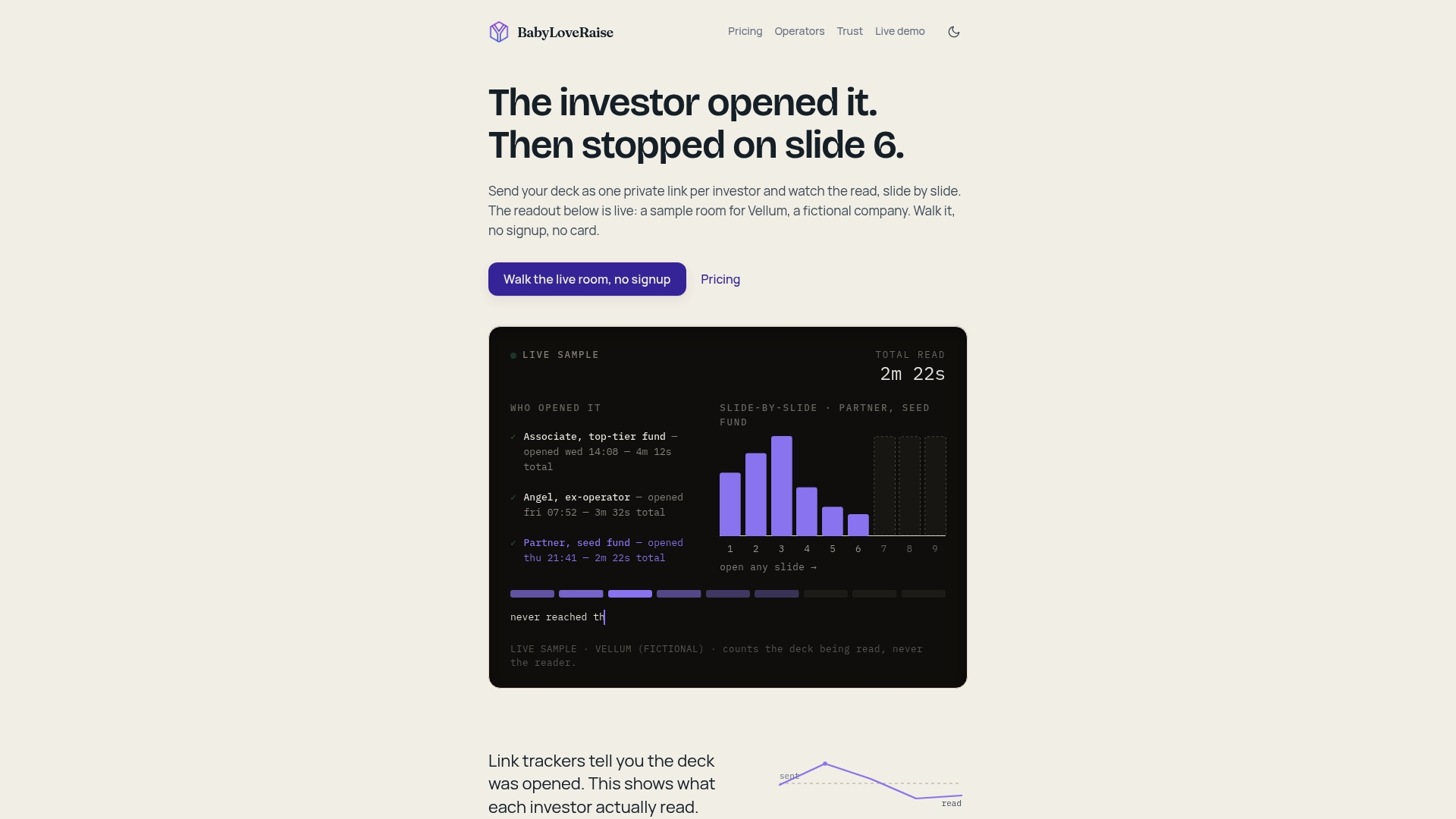
Send one link. When you update the deck, the link updates automatically. The per-slide engagement dashboard shows you who opened it, which slides held attention, and which investors read to the end. That data drives your follow-up sequence directly, so you’re calling the investors who finished the deck, not the ones who never opened it. Downloads carry a measured watermark. When the raise closes, the room converts to a free permanent archive instead of a paywall cliff. For fractional CFOs and advisory firms running multiple raises, the Operator tier provides firm-branded rooms across every client raise at a fraction of virtual data room pricing. Start your raise room and have a canonical link live in under ten minutes.
Sources
- Pitch deck management. Version control for pitch decks.
- mdhrumil/pitchdeckuploader
- Investor Pitch Deck Version Control and Feedback Tracker
- Best pitch deck software in 2026 (free & paid tools) - Prezent AI