
Founders: Prevent Deck Screenshots and Track Who Reads Each Slide
Stop casual pitch deck screenshots without slowing your raise. Use view only links, dynamic watermarks, tiered teasers, and per slide analytics to track...
September 2, 2026 · 12 min read

The most reliable way to prevent deck screenshots is to stop emailing PDFs altogether and share your deck through a secure, view-only raise room with downloads and printing disabled, plus a dynamic watermark tied to each viewer. Layer in a teaser-to-data-room structure and per-slide analytics, and you get something better than screenshot-proofing: a record of who actually read your deck. BabyLoveRaise builds this workflow specifically for fundraises, including per-slide engagement tracking most generic sharing tools skip entirely.
TL;DR:
- Disabling downloads, printing, and adding dynamic watermarks helps track and deter casual screenshots but cannot prevent determined photo captures on mobile devices.
- Stage disclosure strategies like teasers, private links, and data rooms reduce sensitive material exposure and keep deal momentum intact.
- Per-slide engagement analytics offer valuable insights into investor interest and help identify weak points in your pitch, unlike simple screenshot blocking.
- Keep access controls simple early on to avoid alienating investors, reserving stricter measures like private links and shorter expiry for sensitive data stages.
- Perfect screenshot prevention is impossible; focus on traceability, contextual barriers, and meaningful analytics to protect intellectual property effectively.
Table of Contents
- Quick Checklist To Prevent Deck Screenshots Right Now
- How Do You Set Access Controls Without Annoying Investors?
- Does Watermarking Actually Stop Screenshots?
- What’s the Right Order To Share a Teaser, Main Deck, and Data Room?
- What Do Per-Slide Analytics Tell You That Screenshot Blocking Can’t?
- Should You Ask Investors To Sign an NDA?
- Implementation Checklist: Settings You Can Apply in Minutes
- Why Can’t You Fully Block Screenshots on Every Device?
- Is It Legal or Ethical To Restrict Screenshots on a Pitch Deck?
- Does Screenshot Prevention Make Decks Harder To Read?
- What I’ve Learned Watching Founders Fix Their Decks Mid Raise
- Choosing a Raise Room Built for Fundraising, Not Generic File Sharing
- Sources
Quick Checklist To Prevent Deck Screenshots Right Now
You don’t need a security team to lock down a deck before your next investor call. A handful of settings, applied in the right order, cover most of the risk:
- Switch to a view-only link. Disable downloads and printing so the deck can’t be saved as a file.
- Add a dynamic watermark. Stamp each view with the viewer’s name, email, or timestamp so any copy is traceable back to them.
- Tier your materials. Send a short teaser first, the full deck after a call, and reserve financial models for a data room.
- Gate sensitive versions with email capture or single-use links. This confirms who’s actually opening the file.
- Turn on per-slide analytics and first-read alerts. You’ll know the moment someone opens the deck and which slides held their attention.
None of these stop a determined person from snapping a phone photo of their monitor. What they do is remove the casual, low-friction screenshot and leave a clear trail if someone tries anyway.
How Do You Set Access Controls Without Annoying Investors?
View-only mode blocks the easy paths to a copy: no download button, no print dialog, no right-click to save the image. What it can’t stop is someone pointing a phone camera at their screen. That’s the ceiling on any access control setup for pitch decks, and it’s worth setting expectations accordingly rather than promising founders airtight secrecy.
The real decision is how much friction to add for whom. A general list going to warm intros can run on a forwardable link with no email gate. A narrower list, especially near close, deserves single-use or private links tied to a specific email address so you know exactly who opened it.
Recommended settings, in order of how often you’ll use them:
- Disable download and print on every external share.
- Disable text and image copy so slides can’t be lifted into another doc.
- Set link expiry between 30 and 90 days for general outreach; shorten it for time-sensitive data.
- Use a private, single-use link for anyone receiving cap table or financial detail.
- Reserve forwardable links for early-stage teaser sharing, where wider reach helps more than it hurts.
Pro Tip: Match the register to the stage of conversation. First-touch teasers can tolerate a forwardable link; anything sent after a term sheet discussion should be private and tracked, not forwardable.
Does Watermarking Actually Stop Screenshots?
Watermarking doesn’t stop a screenshot from happening. It changes what’s in the image once someone takes it. A static “Confidential” stamp in the corner is easy to crop out and easy to ignore. A dynamic watermark, one that embeds the viewer’s name, email, and timestamp directly into the slide, travels with any screenshot or photo taken of it, which is why document security platforms build this as a core feature rather than a cosmetic add on.
That traceability is the deterrent. An investor who knows their identifier is baked into every slide thinks twice before forwarding the deck around their partnership without asking first.
A few practical rules keep watermarks from wrecking readability:
- Keep opacity low enough that charts and numbers stay legible, typically 10 to 20 percent gray.
- Place the mark diagonally across the slide body rather than confined to one corner, since a corner stamp gets cropped out in seconds.
- Repeat the identifier at least once per slide rather than once per deck, so a single cropped screenshot still carries it.
BabyLoveRaise’s guide to watermark examples and templates shows placement options that stay readable on both desktop and mobile.
What’s the Right Order To Share a Teaser, Main Deck, and Data Room?
Sending your full deck, cap table, and financial model to every warm intro is how sensitive material ends up in inboxes you never intended. The fix is staged disclosure, not blanket secrecy.
- Teaser (5 to 7 slides). Problem, solution, traction, and ask. No financials, no cap table. This goes out widely and cheaply.
- Main deck (10 to 15 slides). Sent after a call or warm introduction, once there’s genuine interest. This is where your view-only link and watermark do their work.
- Data room. Financial model, cap table, contracts. Opened only for investors moving toward a term sheet, ideally behind a private, gated link.
This sequencing isn’t just about protecting sensitive slides, it also keeps deal momentum intact. Investors who get a tight teaser first, then a full deck after a real conversation, engage differently than ones who receive everything at once and skim past the parts that matter.
What Do Per-Slide Analytics Tell You That Screenshot Blocking Can’t?
Here’s the uncomfortable truth about deck security: perfect screenshot prevention doesn’t exist on any device, but perfect visibility into who read your deck does. That trade is worth making.
Per-slide engagement data turns two identical silences, “never opened it” and “read every slide and passed”, into two very different signals. One means your subject line or intro needs work. The other means your narrative or your ask needs work.
- Never opened: the deck sat unread for days. Follow up on the intro itself, not the pitch.
- Opened but abandoned early: something in your first three slides lost them. Check whether your hook or market slide is where completion drops off.
- Finished but went quiet: they read everything and still didn’t respond. That’s a narrative or fit problem, not an attention problem.
Per-slide analytics built for fundraises report exactly this: who opened the deck, how long they lingered on each slide, and a notification the moment someone reads it for the first time.
Pro Tip: If completion rates drop sharply on the same slide across multiple investors, that’s not a coincidence. Rewrite that slide before your next batch of sends, not after the round closes.
Should You Ask Investors To Sign an NDA?
Most experienced investors decline NDAs on early-stage decks, and asking for one often reads as inexperience rather than caution. Investors see hundreds of similar pitches; the ask signals you don’t understand how the process usually works, and founder guidance on deck protection consistently recommends skipping it.
A better substitute: a one-line confidentiality footer on your deck, plus a verbal note before the call (“this is confidential, please don’t forward it”). That sets the norm without adding a legal step that stalls momentum.
If you genuinely need an NDA, for a deep technical walkthrough or IP disclosure, keep it narrow: cover the specific material at risk, set a time limit, and skip it for the standard pitch deck entirely.
Implementation Checklist: Settings You Can Apply in Minutes
Set these up once and reuse them for every investor conversation:
- Build a 5 to 7 slide teaser with no financials or cap table.
- Turn on a view-only main deck link with download and print disabled.
- Add a dynamic watermark with viewer email and timestamp.
- Set expiry to 30 to 90 days for general outreach; shorten it for sensitive rounds.
- Use single-use, private links for anyone receiving cap table or financial detail.
- Turn on first-read alerts so you know the moment a deck gets opened.
Fundraises where founders track engagement rather than relying on blocking alone consistently report more targeted follow-ups, because outreach goes to people who actually read the material instead of a flat list of everyone who received a link.
Why Can’t You Fully Block Screenshots on Every Device?
No sharing platform, no matter how locked down, can stop someone from pointing a second phone at their screen and taking a photo. That’s the technical ceiling every founder should understand before spending time chasing a guarantee that doesn’t exist.
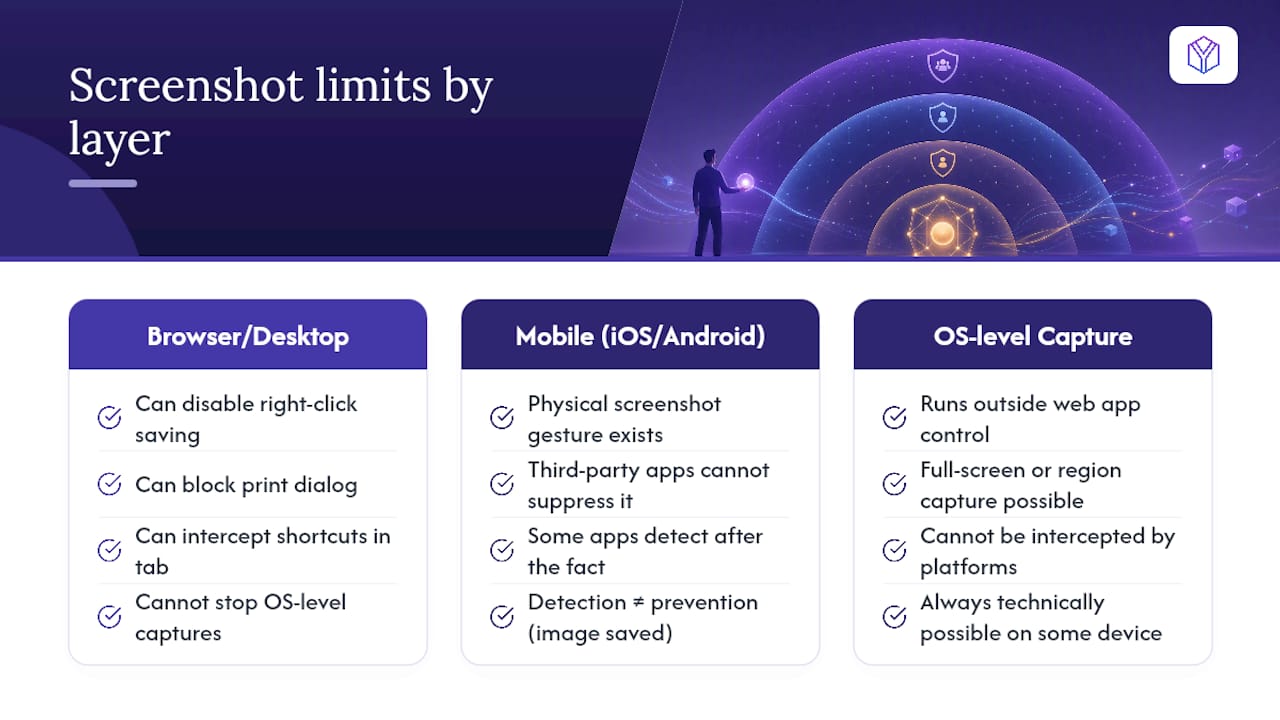
On desktop, browser-based view-only tools can disable right-click saving, block the print dialog, and often intercept common keyboard screenshot shortcuts within that browser tab. But operating-system-level capture tools sit outside any web app’s control. A user can still trigger a full-screen or region capture through built-in OS utilities, and no deck-sharing platform can intercept that call before it happens.
Mobile makes this harder. iOS and Android both expose a physical screenshot gesture that no third-party app can suppress, since the capture happens at the operating system layer, below whatever viewer app displays your slides. Some native mobile apps can detect that a screenshot occurred and fire an alert after the fact, but detection isn’t prevention. The image is already saved.
This is exactly why watermarking that embeds viewer identity matters more than pure blocking. Once you accept that a screenshot is always technically possible on some device somewhere, the goal shifts from prevention to deterrence and traceability. A watermark doesn’t stop the photo. It makes the photo identifiable, which changes behavior more than a locked download button ever will.
Is It Legal or Ethical To Restrict Screenshots on a Pitch Deck?
Restricting how someone views a document you created and own sits well inside normal business practice. It’s your intellectual property, your confidential business plan, and your choice how widely it circulates. Disabling downloads, adding watermarks, and gating access with an email address raise no legal issue for the person sharing the deck.
Where it gets more nuanced is on the receiving end. You can’t retroactively make a phone photo illegal, and you have limited recourse if a recipient takes one despite your controls. What you can do is make redistribution traceable and set clear expectations up front, which is a more realistic goal than pursuing legal action after a leak.
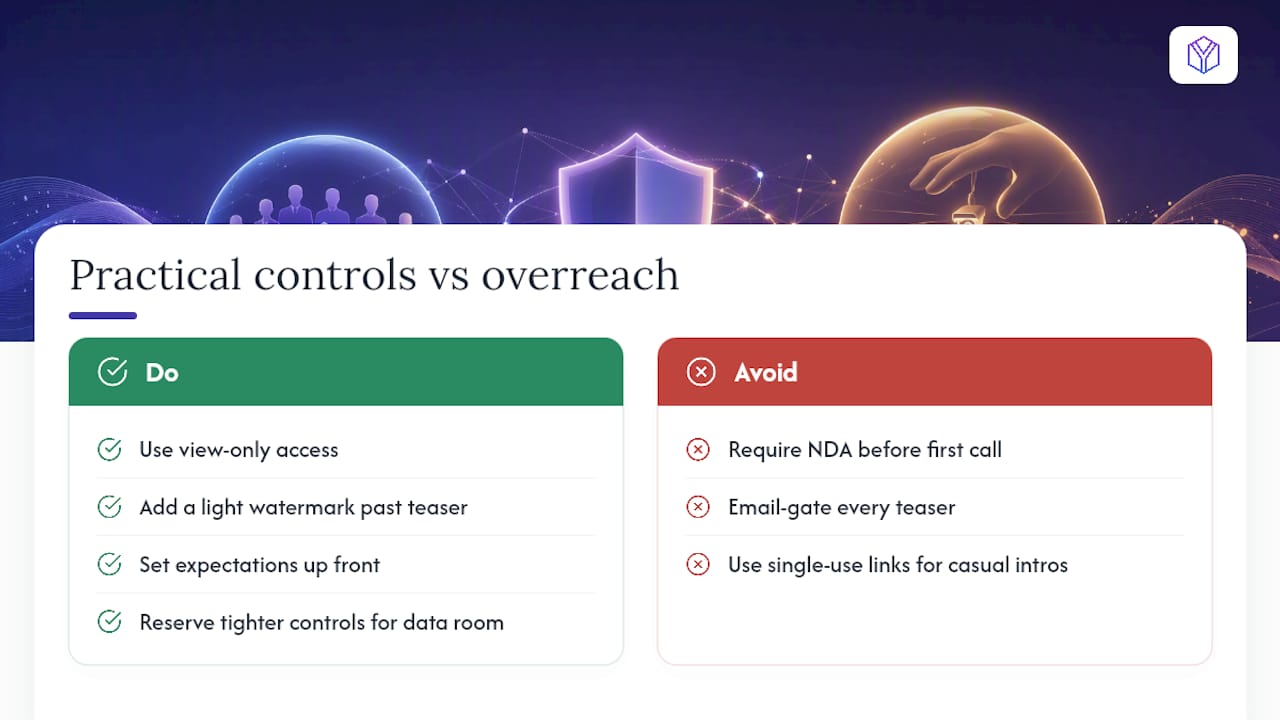
The ethical dimension cuts the other way, too. Aggressive restriction, email gates on every teaser, NDAs before a first call, single-use links for casual intros, signals distrust before a relationship exists. Investors read that friction as a lack of experience, not as diligence. The measured approach, view-only access with a light watermark for anything past the teaser stage, respects both your confidentiality and the investor’s time. Save the tighter controls (private links, email gating, shorter expiry) for the data room stage, where the sensitivity of cap tables and financial models justifies the extra step.
Does Screenshot Prevention Make Decks Harder To Read?
Every control you add trades a little friction for a little security, and the balance matters more than founders often assume. A deck that’s technically locked down but painful to open loses investor attention before the pitch even lands.
Disabling download and print rarely bothers investors; they’re used to viewing decks in-browser through secure links. Watermarks, if kept light (10 to 20 percent opacity, placed diagonally rather than blocking key numbers), barely register as friction at all. Most investors won’t mention them.
Email gating is where the experience can turn. Requiring an email address before a first-touch teaser adds a step that feels transactional at a stage where you’re still building rapport. Save that gate for the main deck or data room, once a real conversation has started. Link expiry causes the most support requests: an investor who wants to revisit your deck three months after your last call and hits an expired link has to reach back out just to see slides they already had access to. A 60 to 90 day window covers most active raises without leaving stale links open indefinitely.
The goal is invisible security. If an investor notices your access controls more than your pitch, you’ve tuned the settings too tight.
What I’ve Learned Watching Founders Fix Their Decks Mid Raise
The founders who raise fastest aren’t the ones with the most locked-down deck. They’re the ones who stop guessing and start reading their own data. I’ve seen the pattern repeat: a founder assumes silence means disinterest, then a first-read alert shows an investor opened the deck twice in one week and stalled on the same market-sizing slide both times. That’s not a lost deal. That’s a rewrite waiting to happen.
One pattern shows up constantly. Founders using per-slide analytics catch a weak slide within their first ten sends, rewrite it, and watch completion rates climb on the very next batch. Screenshot prevention protects your information. Engagement data protects your time, and in a raise, time is the scarcer resource.
— Paul
Choosing a Raise Room Built for Fundraising, Not Generic File Sharing
Generic document trackers treat your pitch deck like any other file share. BabyLoveRaise treats it like what it actually is, the center of an active fundraise, which is why it pairs access controls with data built specifically for that process. You get view-only links with download and print disabled, dynamic watermarking on every share, and three link registers (first send, forwardable, private) so the friction matches the stage of the conversation.
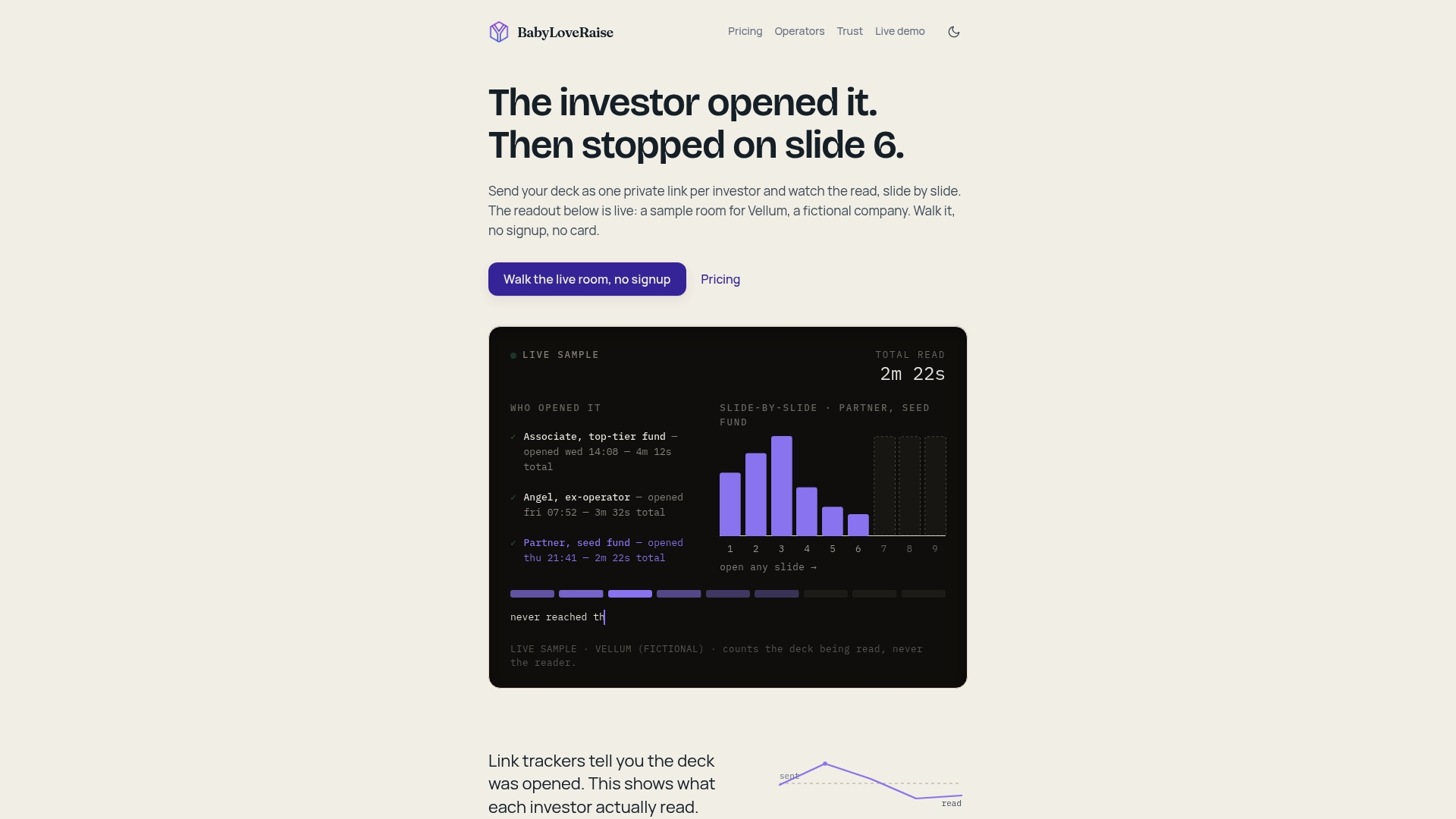
What sets it apart is the analytics layer: per-slide engagement tracking, first-read notifications the moment someone opens the deck, and an owner dashboard that separates “never opened” from “read and passed.” Fundraising advisory firms and fractional CFOs running multiple client raises can run all of it under a white-label Operator tier instead of paying enterprise data-room rates per seat. Pricing runs per raise, not as a forever subscription, and when the round closes, the room converts to a free permanent archive rather than locking your own materials behind a paywall.
If you’re sending a deck this week, check BabyLoveRaise’s pricing and features and set up your first raise room before your next investor call.
Sources
- Pitch Deck Protection: A Founder’s Guide to Smart Secrecy
- How to See If an Investor Opened Your Pitch Deck (and Which Pages They Read) – VeryDRM Content Security Platform