
How to Set Up Pitch Deck Access Control for Investors
Learn effective strategies for pitch deck access control that keep your investors engaged and informed while protecting your content.
August 25, 2026 · 10 min read

Include a clear integration and share-permission plan in your deck, then send it through a permissioned link with per-slide analytics attached. That combination answers the two questions every access-control investor asks before they say yes: does this actually work with what customers already have installed, and can this founder tell me who’s reading and who’s ghosting. Most decks fail on the second half.
Before you send anything, run through this:
- Verify investor email on the primary link rather than trusting a bare URL.
- Make the first send expiring and non-forwardable; open a separate link for partners who need to circulate it internally.
- Default to view-only, and turn on downloads only for due diligence once terms are progressing.
- Flag an NDA toggle for sensitive architecture or customer-data slides.
- Add a measured watermark to any downloadable version so a leaked copy is traceable.
Pro Tip: A deck that tracks per-slide dwell time will tell you which slide killed momentum. That’s the follow-up conversation you actually need to have, not a generic “just checking in” email.
Key Takeaways
Pitch deck access control works best when integration proof, unit economics, and permissioned share links with per-slide analytics all ship together, not as separate afterthoughts.
| Point | Details |
|---|---|
| Lead with integration | Show a named SSO, SAML, or PACS connection point, not a vague “works with your stack” claim. |
| Match permissions to stage | Use verified, expiring, view-only links for first outreach and download-enabled NDA links only for due diligence. |
| Read dwell time as signal | High dwell on one slide means curiosity about that specific claim, not general interest. |
| Fix pitfalls before sending | Swap safety overclaims for pilot numbers and add a unit-economics slide before every send. |
| BabyLoveRaise implements this directly | Raise rooms bundle first-read alerts, per-slide dwell, and three-tier link permissions into one send. |
Table of Contents
- Investor-Ready Slide Structure for Pitch Deck Access Control Startups
- How Should You Set Permissions on a Pitch Deck Share Link?
- Which Pitch Deck Analytics Actually Predict a Yes?
- What Should Your Integration and Economics Slides Actually Say?
- What Mistakes Do Founders Make in Access-Control Pitch Decks?
- How BabyLoveRaise Turns This Checklist Into a Workflow
- The Overlooked Trade-Off in Deck Security
- Send Your Next Deck Through a Raise Room, Not a PDF
- Sources
Investor-Ready Slide Structure for Pitch Deck Access Control Startups
Access-control and identity decks live or die on one question: does this replace expensive hardware, or does it sit on top of what’s already there? Every slide should build toward answering that, in this order:
- Cover — company name, one-line thesis (software overlay vs. hardware replacement).
- Problem — the specific failure mode (badge cloning, orphaned access, slow offboarding).
- Solution — what the product does in one sentence, no jargon.
- Product demo — a simple flow diagram, not a screenshot dump.
- Integration — how it connects to SSO, SAML, or existing PACS hardware.
- Market — sizing tied to a specific buyer (facilities, IT security, property managers).
- Traction — pilot count, install time, retention.
- Business model — per-door, per-seat, or per-site pricing.
- Unit economics — cost-per-door and gross margin at scale.
- Go-to-market — channel partners, integrators, direct sales.
- Competition — positioning against rip-and-replace hardware vendors.
- Team — relevant security, hardware, or enterprise-sales background.
- Financials — 18 to 24 month runway plan.
- The ask — round size and use of funds.
The integration slide carries the most weight in this category, and it’s the one founders rush. A teardown of Oloid’s 21-slide deck shows the pattern clearly: the company positioned itself as a software overlay that avoids ripping out existing badge readers, then backed that claim with a retrofit timeline and a cost-per-door comparison against hardware replacement. That’s the template. Show a flow diagram with two or three integration points labeled plainly, then let a number do the persuading.
Alcatraz AI took the opposite hardware-forward approach in the deck that helped it raise a $25 million Series A, leading with its facial-recognition device integrating directly with existing badge readers. Both approaches work. What they share is specificity: named integration points, not a vague “works with your stack” claim.
Investors in this category expect three evidence items regardless of whether you’re hardware or software: how many doors or sites are in pilot, how long installation actually takes, and what it costs per door compared to the incumbent option. If you don’t have real numbers yet, say what you’re measuring and when you’ll have results. A missing metric is forgivable. A vague one isn’t.
How Should You Set Permissions on a Pitch Deck Share Link?
Not every investor touchpoint needs the same access level, and treating them all the same is how founders either lose control of their deck or annoy the exact people they’re trying to close.
Match the permission to the stage of the conversation:
- First outreach: a verified, expiring link, view-only, no downloads. This is your primary investor link, and it should be the one you track hardest.
- Warm follow-up after a good meeting: the same link type, but you can extend the expiration or issue a named link for that specific partner.
- Due diligence: a separate download-enabled link, often with an NDA toggle switched on for slides covering architecture, customer lists, or security posture.
- Forwarded to an associate or co-investor: a distinct forwardable link so your analytics don’t conflate a partner’s read with an associate’s.
Data-room platforms have standardized on this multi-link pattern for a reason. AngelList’s data room documentation describes named access links with independent verification requirements, expiration settings, and NDA enforcement per link, which lets you separate a genuine investor read from a link that got passed around an office. Intralinks’ permissioning workflow shows the same principle at institutional scale, with role-based access and bulk uploads for larger investor lists.
One guardrail worth stating plainly: an NDA toggle on a link is an operational speed bump, not a legal contract. If a slide contains information you’d genuinely be harmed by if it leaked, get a signed NDA before that conversation happens. Access controls slow down casual forwarding. They don’t replace a lawyer.
Which Pitch Deck Analytics Actually Predict a Yes?
Four signals matter, and they mean different things depending on which one fires.
- First-read notification: tells you the deck was opened at all. Silence here means it’s stuck in an inbox, not that they passed.
- Per-slide dwell time: shows which claim held attention and which one got skimmed. Long dwell on your economics slide usually means they’re doing math in their head, which is a good sign.
- Completion: did they reach the ask? Partial reads that stop at the market slide often mean the sizing didn’t land.
- Viewer identity verification: confirms who actually opened it, separating a real investor read from a forwarded copy sitting on an associate’s screen.
Use these as decision rules, not vanity metrics. A verified read with high dwell on your integration slide and full completion earns a same-day follow-up. A read that stalls halfway means your narrative has a gap, not that the investor is uninterested. No open after a week is a nudge, not a rewrite.
Treat the whole system as a hypothesis test rather than surveillance: dwell time signals curiosity about a specific claim, and low completion signals a clarity problem with the slide, not necessarily the investor’s interest level. Track document-level engagement, not personal browsing behavior. The goal is a better follow-up conversation, not a profile on the person reading it.
What Should Your Integration and Economics Slides Actually Say?
Specific, forgettable language kills good decks. Try headlines like these instead of generic feature lists:
- Integration slide: “Deploys on existing badge readers in under 48 hours, no rip-and-replace.”
- Demo slide: “One dashboard, three data sources: SSO, SAML, and your current PACS feed.”
- Economics slide: “$40 per door installed versus $220 for hardware replacement.”
Pair each with a visual that does the explaining a paragraph can’t: a three-box flow diagram for integration, a simple bar chart for cost-per-door against the incumbent, and a horizontal timeline showing install day one through day thirty.
The reason a cost-per-door bar chart works better than a paragraph of justification is that it answers the investor’s real question in half a second: is this cheaper than tearing out what’s already there? If the answer is yes and the chart shows it, you’ve removed the single biggest objection in this category before they even ask it out loud.
Each of these examples exists to kill a specific objection: “how hard is this to install,” “does it actually replace my existing system,” and “is this cheaper than the alternative.” Answer those three before the investor has to ask.
What Mistakes Do Founders Make in Access-Control Pitch Decks?
- Overclaiming safety or privacy. Swap “eliminates unauthorized access” for “reduces unauthorized access incidents by [your actual pilot number],” and cite the pilot.
- Skipping unit economics. Add a per-door or per-seat cost slide even with early, rough numbers, labeled as estimates.
- No integration proof. Include one named integration point (a specific SSO provider or PACS vendor) rather than “integrates broadly.”
- Hardware slides with no business model. Follow every hardware slide with a pricing and margin slide, no exceptions.
Before sending, check every claim against your own pilot data and remove any adjective you can’t back up with a number.
How BabyLoveRaise Turns This Checklist Into a Workflow
BabyLoveRaise builds the checklist above into the send itself, rather than leaving founders to cobble it together across email and a Drive folder. A raise room gives you a first send link, a forwardable link, and a private invite link, each trackable separately, with expiration and a measured watermark available on any downloadable version.
The founder workflow looks like this: create the room, set your primary investor link to expire in two weeks, send it to your prioritized list, then act on the signals as they come in. A first-read notification with strong per-slide dwell on your economics slide is a same-day follow-up. A week of silence is a nudge, not a rewrite.
| Feature | What it replaces |
|---|---|
| Per-slide dwell tracking | Guessing which slide lost the room |
| First-read notification | Wondering if the deck was even opened |
| Three-tier link permissions | Manually managing separate PDF versions |
Founders who want to see the workflow directly can start at BabyLoveRaise.
The Overlooked Trade-Off in Deck Security
Most fundraising advice treats access control as an afterthought, something you bolt on after the deck is “done.” That’s backward for this category specifically. If you’re pitching an identity or access-control product, the way you share your own deck is a live demo of whether you practice what you sell. An investor who opens a bare, unprotected PDF link from a security founder notices.
The conventional wisdom oversells NDAs and undersells analytics. Founders spend disproportionate energy negotiating NDA language and almost none deciding who should get a download versus a view-only link, or what they’ll actually do when a slide gets skimmed. NDAs matter for genuinely sensitive due diligence material. For the first send, permissioned links and honest tracking accomplish more, because they generate the information you need to run a good follow-up, not just legal cover.
If you take one thing from this: fix your integration slide and your permission strategy before you touch your NDA template. The deck’s job is to get read completely by the right five people. Everything else is downstream of that.
— Paul
Send Your Next Deck Through a Raise Room, Not a PDF
BabyLoveRaise gives you what a plain PDF attachment never can: a first-read notification the moment an investor opens your deck, and a per-slide dwell record that shows exactly where their attention held or dropped. That’s a real edge over emailing a static file and waiting.
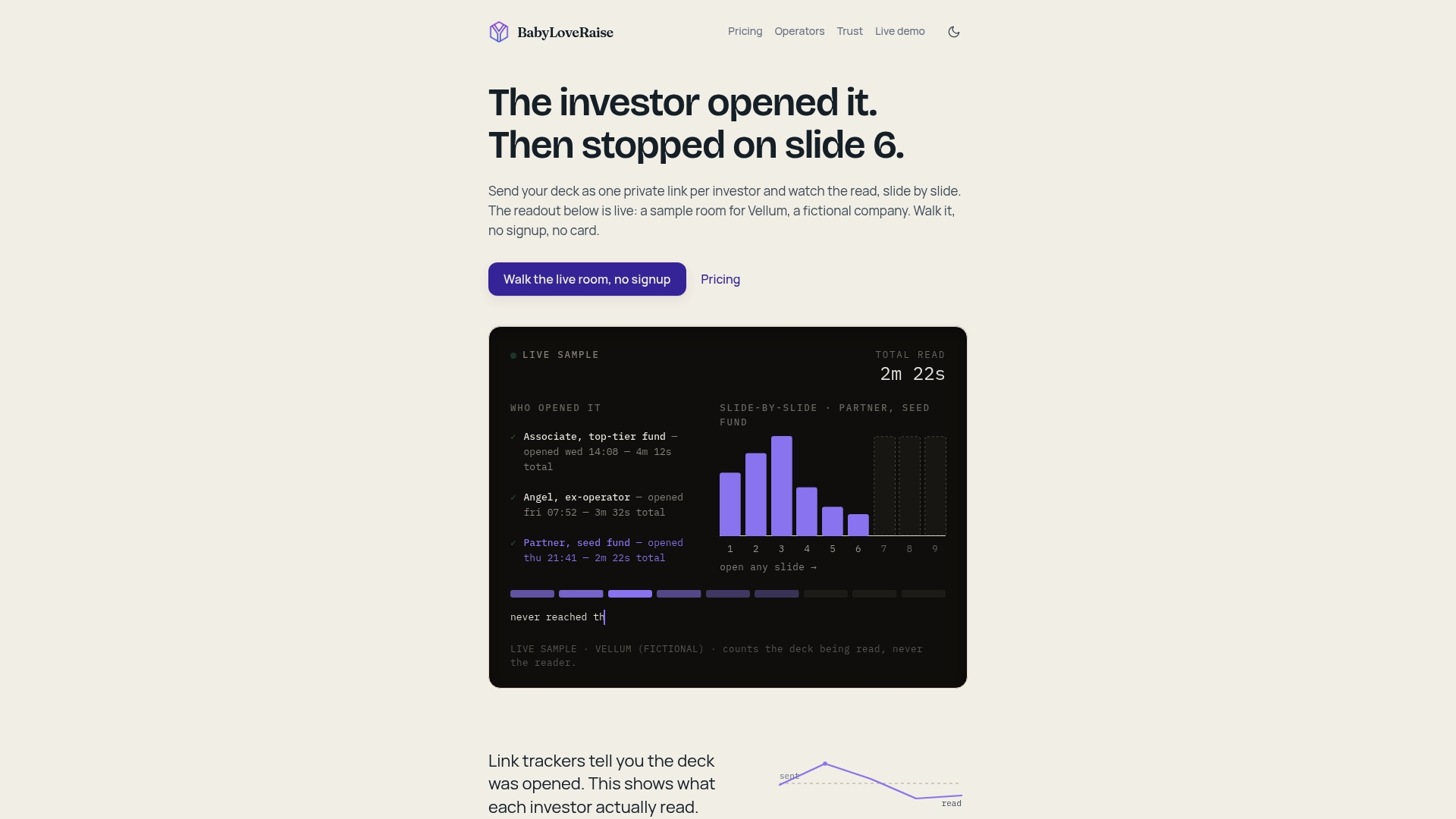
Instead of managing three versions of the same file for three different audiences, you create one room, set a primary link that expires in two weeks, a forwardable link for partners, and a private invite link for due diligence, each with its own watermark and download settings. When the raise closes, the room converts to a free permanent archive instead of disappearing behind a paywall.
If you’re preparing to send your deck to a prioritized investor list this quarter, set up your raise room at BabyLoveRaise and start tracking who actually reads it.
Sources
For slide sequencing, see BabyLoveRaise’s investor-focused slide order guide and pitch deck analytics breakdown. For security architecture, review cloud security best practices for startups.
- AI Startup Alcatraz AI Raised $25 Million With This Pitch Deck - Business Insider
- Permissioning users — FundCentre Fundraising (Intralinks support)
- Inviting visitors & permissions — AngelList Data Room (support)
- Oloid Pitch Deck Breakdown: All 21 Slides - StartupFundraising