
Turn Reopens into Timing: Track Pitch Deck Views for Founders
Learn which deck signals matter, how to send one tracked link per investor, use reopens and first-read alerts, and act with a raise room to time follow-ups.
September 6, 2026 · 8 min read

Yes, you can track pitch deck views, and you should. Tracked links replace flat PDF attachments with a live record of who opened your deck, how long they spent on each slide, whether they came back for a second look, and if someone new forwarded it along. Send one unique link per investor, turn on bot filtering so email security scanners don’t skew your numbers, then read the signals in combination before you decide who gets a follow-up this week.
TL;DR:
- Tracking links provide detailed engagement data, including who opened the deck, how long they viewed each slide, and the number of revisit visits.
- Setting up individual links for each investor and enabling slide analytics helps attribute actions accurately and identifies genuine interest.
- Reopen patterns, such as multiple views days later, signal internal discussion, making timing of follow-ups more strategic.
- Using access controls like email verification is recommended once initial interest is established, but open links are better for cold outreach to maximize engagement.
- A raise room platform like BabyLoveRaise offers automated tracking, version control, and alerts, streamlining the fundraising process and improving follow-up precision.
Table of Contents
- What Does Tracking a Pitch Deck Actually Measure?
- How Do You Set Up Tracked Pitch Deck Links?
- How Do You Read and Act on Pitch Deck Engagement Data?
- Access Controls and Investor Etiquette
- How a Raise Room Puts These Practices Into Action
- One Tactic Worth Stealing From the Data
- Try a Raise Room for Your Next Deck Send
- Sources
What Does Tracking a Pitch Deck Actually Measure?
A tracked link turns your pitch deck into a page that reports back. Every open, every slide, every return trip gets logged, and that record replaces guesswork with actual behavior. Here’s what the data usually captures:
- Opens: a timestamp for when the link was first clicked, and by whom if the link is unique to that investor.
- Dwell time: seconds spent on each slide, which tells you where attention concentrated and where it dropped.
- Completion rate: whether the reader scrolled through to your last slide or stopped somewhere in the middle.
- Return visits: a second or third open of the same link, often the strongest sign someone is thinking it over.
- Additional-viewer events: a new device or IP opening a link you sent to one person, which usually means it got forwarded to a partner or associate.
- Suspected-automation flags: opens that look like an email security scanner rather than a person, based on timing and behavior patterns.
One caveat matters more than any single metric: an open is not the same as a verified identity. Unless you gate the deck with an email requirement or verification step, you know a link was opened, not necessarily by whom. Per-slide analytics and return-visit alerts rank among the strongest signals available for gauging engagement, but a single data point rarely tells the full story. Long dwell time on your financials slide plus a reopen three days later is a real pattern. A ten-second full scroll through all twelve slides usually means someone skimmed it on their phone between meetings.
How Do You Set Up Tracked Pitch Deck Links?
Getting a tracked link running takes less time than writing the email you’ll send it in. The mechanics are simple, but the choices you make at setup shape the quality of the data you get back.
- Upload your deck. Most raise-room tools accept PDF, PPTX, or a Google Slides export, then convert it into a trackable page.
- Generate one link per investor. A single shared link muddies your data. Individual links let you attribute every open, dwell second, and reopen to a specific name.
- Set access controls. Choose open access for cold outreach where friction kills response rates, email required for a lighter touch, email verification when you need confirmed identity for diligence, or a restricted allowlist for sensitive later-stage conversations.
- Turn on per-slide analytics, suspected-automation filtering, and first-read alerts before you send anything.
- Test the link yourself first. Send it to your own inbox or a cofounder and confirm the alert fires and the slide data logs correctly.
- Keep version control active so a deck update pushes to everyone who already has the link, rather than forcing you to resend.
Pro Tip: Send yourself the tracked link from a personal email address you don’t normally use for work. It’s the fastest way to see exactly what an investor sees when the first-read alert lands in your inbox.
Once the link is live, resist the urge to recheck it every hour. The setup work is done. The data will come.
How Do You Read and Act on Pitch Deck Engagement Data?
No single metric should trigger a decision on its own. The value shows up when you stack signals: a long dwell time on your traction slide combined with a full completion and a reopen two days later reads very differently than one quick, incomplete skim.
- Long read, full completion: worth a warm, specific follow-up referencing the deck rather than a generic check-in.
- Skim with an early drop-off: your opening slides may not be earning attention. Consider revising the hook before you send more links.
- Reopen after several days: often means the deck got discussed internally. A short note offering to answer questions can land well here.
- Additional-viewer event: someone forwarded it to a partner or analyst. That’s usually a positive sign worth a light acknowledgment, not a probing question about who saw it.
- Suspected-automation flag: ignore it. That open almost certainly came from a security scanner, not a human, so don’t count it toward your outreach math.
| Signal pattern | Likely meaning | Suggested action |
|---|---|---|
| Full read, no reopen | Reviewed once, decision pending | Wait a few days, then send a brief update |
| Full read plus reopen | Active internal discussion | Send a targeted follow-up with new detail |
| Partial read, quick exit | Low initial interest or weak opening slides | Revise the deck’s first three slides |
| New viewer on existing link | Deck was shared internally | Light acknowledgment, no direct ask |
The core discipline here is preparation, not proof: use the signal to decide what to say next, not to convince yourself of an outcome the data can’t actually guarantee.
Access Controls and Investor Etiquette
Every gating choice trades friction for identity. An open link with no barrier gets more raw opens but tells you less about who’s behind them. Email verification tells you exactly who’s reading but adds a step that some investors, particularly on a first cold touch, will simply skip.
A few rules of thumb make this easier:
- Skip email gates for first-contact cold outreach. Friction at that stage costs you opens you’ll never get back.
- Require email verification once you’re past initial interest and into real diligence, where you need to know exactly who’s reviewing your financials.
- Use a restricted allowlist for your most sensitive later-stage materials, like detailed cap tables or customer contracts.
- Keep retained data lean. Store what helps you follow up intelligently, not a behavioral profile of every reader.
Pro Tip: If an investor asks what you can see on your end, tell them plainly. Founders who explain their tracking upfront tend to get a better reaction than those who let it come up as a surprise.
Transparency about what you measure, and restraint about what you infer from it, protects the relationship more than any feature ever will. Treat the data as a tool for better timing, not a way to read someone’s mind.
How a Raise Room Puts These Practices Into Action
A raise room built specifically for fundraising, rather than general document sharing, maps directly onto the workflow above. BabyLoveRaise generates a unique per-investor link for every send, logs per-slide dwell time and completion, and fires a first-read alert the moment a deck opens.
- Per-slide analytics show exactly where attention concentrated or dropped.
- Suspected-automation labeling filters out scanner opens before they reach your dashboard.
- Version control means an updated deck reaches everyone on the existing link automatically.
- Per-raise pricing rather than a permanent per-seat subscription fits founders who need this for one fundraise, not forever, and an Operator tier extends the same workflow to advisors running several client raises at once.
The two silences that look identical without tracking, “never opened it” and “read everything and passed,” become two different, actionable states once you can see the data.
Pro Tip: Start with one link per investor, alerts on, and a plain access setting. Add verification only once a conversation moves toward real diligence.
A copyable starter workflow: upload the deck, generate individual links, send, watch for the first-read alert, then let dwell and reopen patterns decide who gets a follow-up first.
One Tactic Worth Stealing From the Data
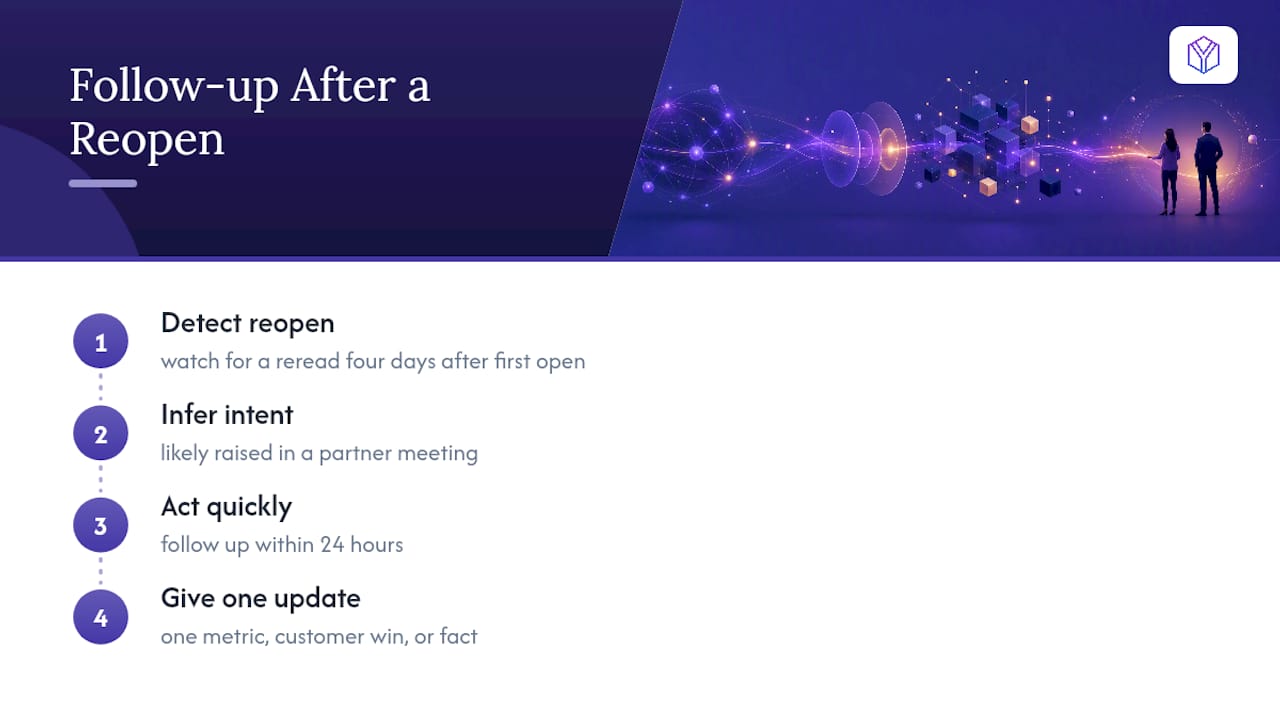
The single most useful thing I’ve seen deck analytics do is turn a reopen into a timing cue. An investor who rereads your deck four days after the first open is telling you something without saying a word: it came up again, probably in a partner meeting. That’s the moment to send a short, specific note, not a generic nudge…
The tactic is simple enough to test on your very next send: watch for the reopen, then follow up within 24 hours with one new piece of information, a metric update, a customer win, anything that gives the reread context something to attach to.
— Paul
Try a Raise Room for Your Next Deck Send
If you’re ready to stop guessing which investors actually read past your intro slide, a raise room gives you the answer without turning your fundraise into a spreadsheet project. BabyLoveRaise is built specifically for the length of a raise, not a permanent per-seat contract you’ll keep paying for after you close, and pricing follows that logic: one round, one room, one price.
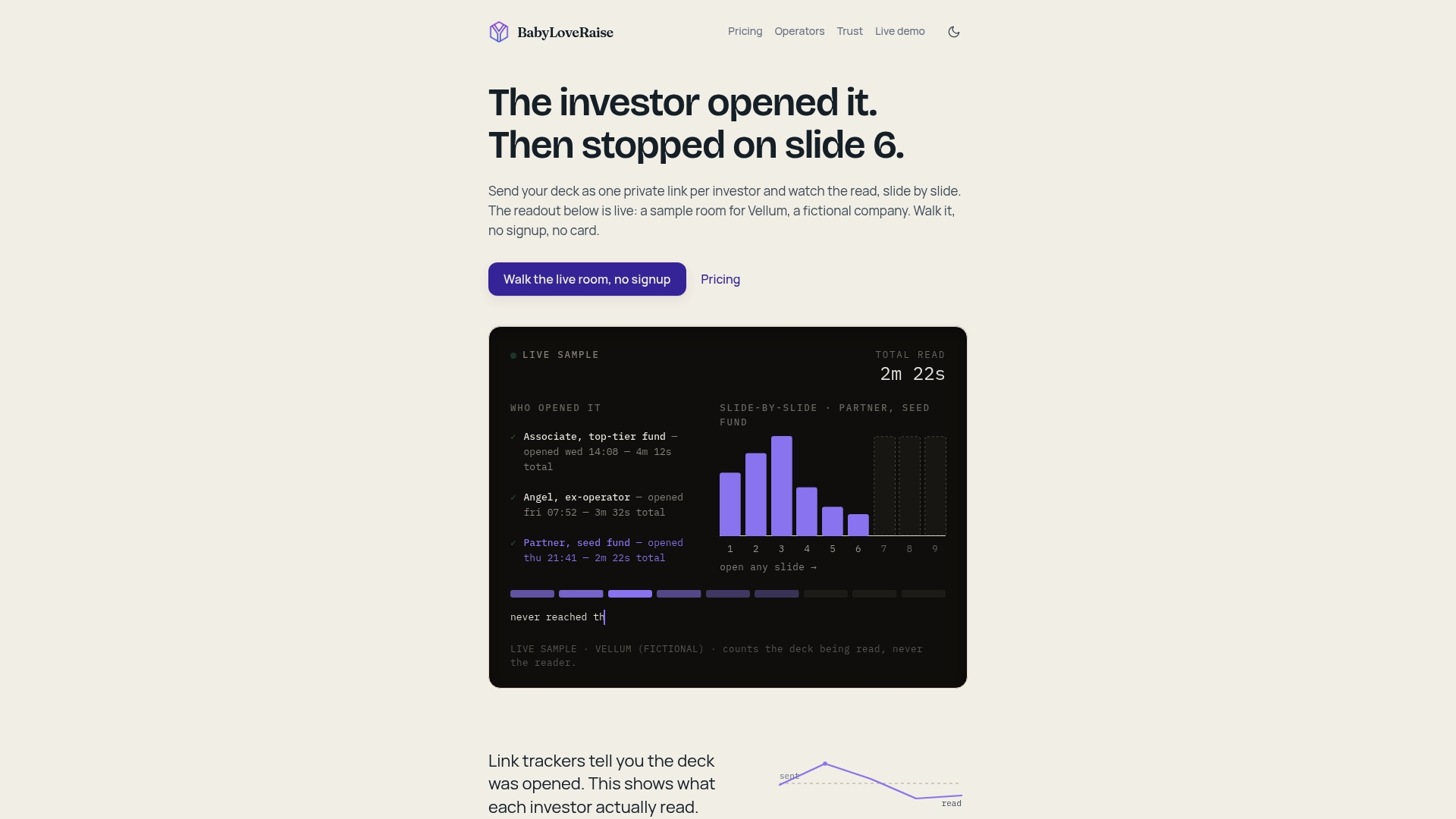
Open a free test raise room, upload your current deck, generate one per-investor link, and turn on first-read alerts before your next send. Once the round closes, the room converts to a free archive instead of disappearing behind a paywall. Start with BabyLoveRaise and see exactly who’s reading before your next follow-up email goes out. And while you’re polishing the deck itself, a professional team photo on your intro slide does more for credibility than most founders assume.
Sources
- How to Share and Track Fundraising Materials With Investors
- How to Create a Professional Team Photo for a Pitch Deck