
Founders' Investor CRM Spreadsheet: 3 Tabs, Weekly Review, Deck Data
For founders: build an investor CRM spreadsheet with three linked tabs, four required fields, a weekly review cadence, and optional deck engagement data.
September 19, 2026 · 10 min read

Use a Google Sheets CRM with three linked tabs—Companies, People, and Opportunities—as your fastest path to an investor-ready pipeline. The single rule that makes it work: every open opportunity needs an owner, a stage, a next action, and a next action date. Skip any of the four and the deal is effectively unmanaged, no matter how many rows you’ve filled in.
TL;DR:
- A spreadsheet CRM requires clear ownership, stages, next actions, and next action dates for each opportunity to remain effective.
- Using fixed, observable criteria for each deal stage improves tracking accuracy and reduces subjective guessing.
- Weekly reviews and follow-up cadences are essential to keep the pipeline current and prevent deals from stalling or being forgotten.
- Transition to dedicated software is advisable once managing over 50 opportunities or needing enhanced permissions and automation.
- Deck analytics tools like BabyLoveRaise can provide critical engagement insights that a simple spreadsheet cannot capture.
BabyLoveRaiseSee Which Investors Read Your DeckBabyLoveRaise shows who opened your deck, who reached the last slide, and where attention dropped during your raise.Explore BabyLoveRaise
Table of Contents
- What Is an Investor CRM Spreadsheet, and Which Templates Should You Copy?
- What Fields Turn a Spreadsheet Into an Investor CRM?
- How Do You Define Stages So They Are Not Just Guesses?
- How Do You Track Outreach So Nothing Falls Through?
- How Often Should You Review the Pipeline, and What Does Deck Data Add?
- When Should You Move Off Spreadsheets and Onto Dedicated Software?
- Running a Raise on Disciplined Spreadsheets, Not Willpower
- Where BabyLoveRaise Fits Once the Spreadsheet Isn’t Enough
- Sources
- FAQ
What Is an Investor CRM Spreadsheet, and Which Templates Should You Copy?
An investor CRM spreadsheet is a shared sheet that tracks every prospective investor through your fundraise, from first contact to signed check, in place of a dedicated CRM tool. It’s the standard starting point for pre-seed and seed rounds because it costs nothing and takes minutes to set up. Several free templates already do most of the structural work for you.
- The Series A Investor CRM Template by Alberto Rizzoli is a lightweight Notion build for tracking outreach and stages during Seed or Series A raises.
- Cake Equity’s investor CRM template is a simple Google Sheet bundled into a broader equity toolkit, useful for basic round planning without extra features.
- Techstars’ Build Your Investor Pipeline Worksheet is a workshop-style tool built around defining a target list and outreach cadence.
- The GardinerColin fundraising guide pairs a downloadable Google Sheets CRM with a genuinely deep pipeline playbook.
- Sourcetable’s startup fundraising tracker goes further, adding diligence organization and round management for founders who need more than an outreach list.
Pick based on round stage: outreach-heavy templates for early conversations, Sourcetable’s tracker once diligence and closing logistics enter the picture.
What Fields Turn a Spreadsheet Into an Investor CRM?
A spreadsheet becomes a real investor management template the moment it stops being a list and starts being a system of record. That means three linked tabs and a fixed set of required fields, not a pile of loose notes in one giant sheet.
Companies holds the fund or angel entity, its focus, and check size range. People holds individual contacts linked to a company by a unique ID, since one fund often means three or four relevant people. Opportunities is where the deal itself lives, linked to both, so a single company can have multiple people and multiple live conversations without duplicate rows.
Every row in Opportunities needs these fields, based on what the Accemind spreadsheet CRM playbook identifies as the investor-ready minimum:
- Owner (who on your team is driving this relationship)
- Stage (where the deal sits in your pipeline)
- Next action (the specific task, not “follow up”)
- Next action date
- Value (target check size)
- Expected close month
- Last touch date
- Reason code (why a deal stalled or passed)
Simple formulas do the heavy lifting: a FILTER formula surfaces every row where the next action date is today or earlier, COUNTIF totals deals per stage for your weekly review, and a days-in-stage calculation (today’s date minus last touch date) flags anything going stale.
Pro Tip: Lock the owner field with a dropdown validation tied to your team’s names, not free text. “Sarah,” “sarah,” and “S. Kim” will otherwise register as three different owners the first time someone runs a COUNTIF.
How Do You Define Stages So They Are Not Just Guesses?
Vague stages like “warm” or “interested” are the fastest way to lose credibility with your own team, because they’re subjective and impossible to audit. Every stage needs a clear entry condition and a clear exit condition tied to an observable event, not a feeling.
A workable sequence looks like this:
- Research: entry is identifying a fit based on stage, sector, and check size; exit is a first outreach sent.
- Outreach: entry is the first email or intro request; exit is a scheduled call.
- Meeting: entry is a booked call; exit is either a second meeting or a clear pass.
- Due diligence: entry is a data room request; exit is a term sheet or a documented no.
- Soft commit: entry is a verbal yes; exit is a signed document or a withdrawal.
- Committed: entry is a signed SAFE, note, or wire; this stage doesn’t move further.
- Passed: entry is any explicit or de facto no.
Pair stages with status codes, based on the tagging system in HeyEveryone’s outreach CRM template: No reply, Replied-neutral, Positive, Negative. An investor who replied to schedule a call is Positive; one who replied only to say “not right now, keep me posted” is Replied-neutral, not Positive, even though it feels encouraging. Tie every stage advance to a specific evidence point, a booked meeting, a data room request, a term sheet, rather than a gut read on how the last call went.
How Do You Track Outreach So Nothing Falls Through?
Outreach only works as a system if the sheet tells you what to do the moment you open it each morning, not after you’ve scrolled through fifty rows trying to remember who owes you a reply.
Add these columns to your Opportunities tab, following the structure recommended by HeyEveryone’s Google Sheets system:
- Outreach date (first contact)
- Last email sent
- Email status (sent, opened, bounced)
- Reply status (using the status codes above)
- Last reply date
- Follow-up date
Build a filtered view, or a second sheet using FILTER, that shows only rows where the follow-up date is today or earlier. Add conditional formatting that turns a row red once it’s three or more days overdue. That single view is what makes the sheet a daily action engine instead of an archive.
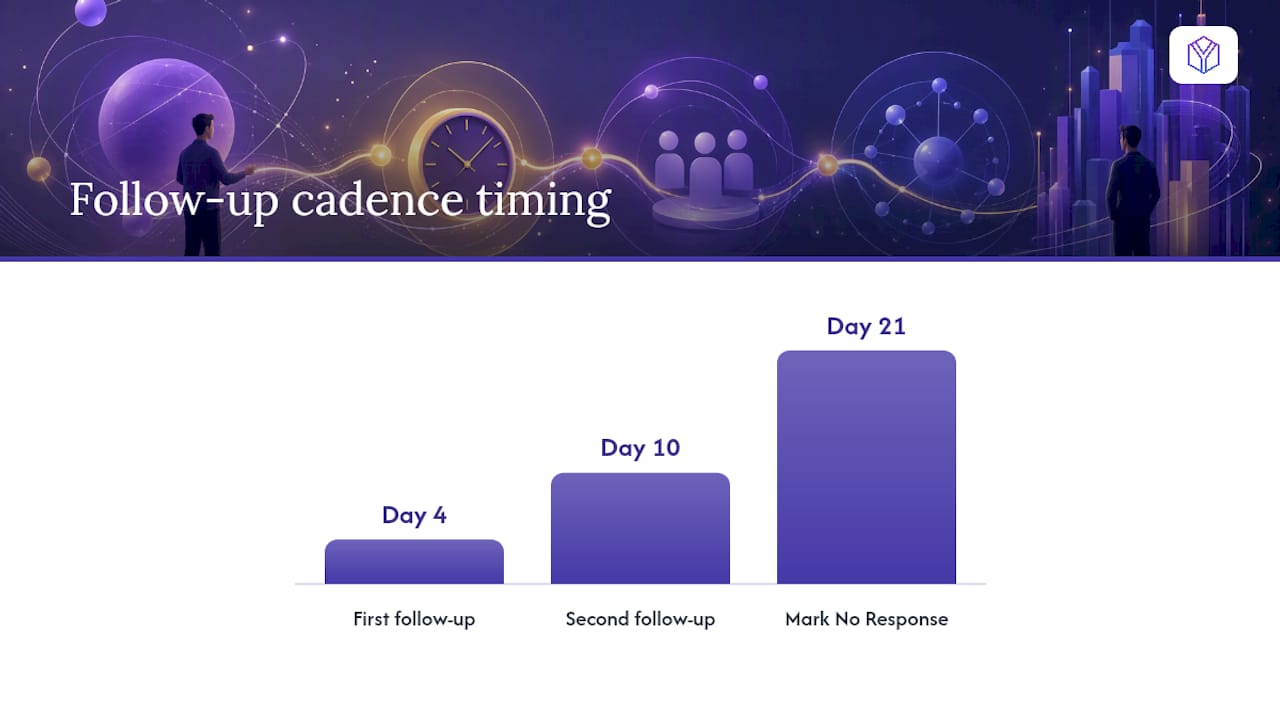
A basic cadence works well for most rounds: first follow-up at day 4 if there’s no reply, a second at day 10, and a status change to “No response” at day 21 if you’ve heard nothing. Update stage and next action immediately after every meeting, not at the end of the week. Deals decay fast when the record lags behind reality.
Pro Tip: If a founder’s calendar shows a call happened but the sheet still says “Meeting scheduled” three days later, that’s the single most common way pipelines quietly lose accuracy.
How Often Should You Review the Pipeline, and What Does Deck Data Add?
A weekly rhythm is what keeps a spreadsheet CRM from decaying into a graveyard of stale rows. Set a recurring 30-minute review, ideally the same day and time every week, where the pipeline owner walks through every open opportunity.
- Update every row before the meeting, not during it.
- Rank the top five active opportunities and decide what happens next for each.
- Flag any deal missing a dated next action as blocked, and fix it on the spot.
- Assign a clear owner and data steward so updates don’t fall between two people who each assumed the other handled it.
That review is also where deck engagement analytics earn their place. A platform like BabyLoveRaise tracks per-slide dwell time and sends a notification on first read, which solves a specific problem: “never opened the deck” and “read every slide and passed” look identical in a spreadsheet with no data, but they call for completely different follow-ups. If the analytics show three investors dropped off at the same slide, that’s a signal to revise that slide, not to keep sending the same deck to a cold list. According to the Accemind playbook, pipelines that enforce one owner per opportunity and a dated next action for every row are the ones that survive investor scrutiny.
When Should You Move Off Spreadsheets and Onto Dedicated Software?
Migrate once your target list passes roughly 50 active opportunities, once more than one person needs write access at the same time, or once you need permissions, audit trails, or automation that spreadsheets simply weren’t built to handle. Larger raises sometimes also trigger a need for institutional-grade controls, the kind referenced in AICPA’s SOC framework guidance, particularly when outside advisors or larger funds expect a documented process.
Whatever you migrate to, carry these over intact, since losing them is what actually costs founders time:
- Your exact stage definitions and entry/exit criteria
- The four required fields: owner, stage, next action, next action date
- Ownership rules (one owner per opportunity, no exceptions)
- Reason codes for passes and stalls
- The weekly review cadence itself
A short migration checklist keeps the transition clean: export a clean CSV, reconcile any naming inconsistencies between sheets, rebuild your filtered “follow-up today” view in the new tool, and import notes and reason codes rather than starting them from scratch. Skipping the reconciliation step is how founders lose months of institutional memory in a single import.
Running a Raise on Disciplined Spreadsheets, Not Willpower
Most failed pipelines aren’t failing because the founder picked the wrong template. They’re failing because nobody enforces the four required fields, and “next action” quietly turns into a vague placeholder nobody updates. Pipeline blindness, thinking a round is further along than it is, almost always traces back to missing next action dates, not a bad list of investors.
Analytics fix the guessing part of this problem. Knowing which slide killed an investor’s attention is a far better prioritization signal than a hunch. For deeper structure on this, our guide to investor pipeline stages and our breakdown of pairing deck analytics with a CRM go further than this article’s scope allows.
— Paul
Where BabyLoveRaise Fits Once the Spreadsheet Isn’t Enough
A spreadsheet tells you that an investor opened your email. It can’t tell you whether they actually read slide 9, your traction slide, or bailed after slide 3 and never came back. That’s the specific gap BabyLoveRaise closes: instead of a document link that goes dark, you send one raise room link, and it notifies you on first read while logging per-slide dwell time for every investor who opens the deck.
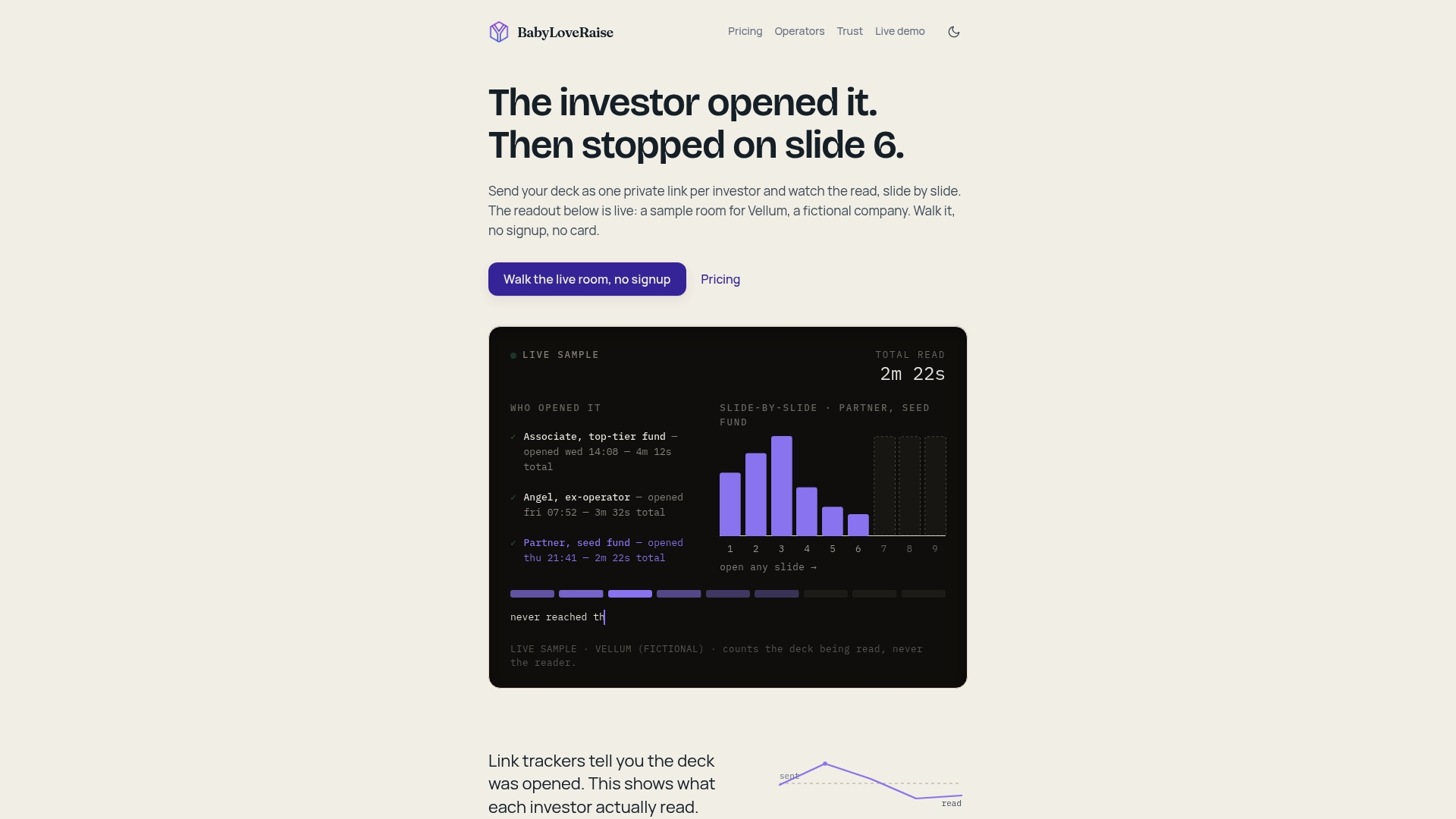
The owner dashboard solves the exact ambiguity a spreadsheet can’t: “never opened it” and “read everything and passed” look identical in a CRM with no engagement data, but they demand opposite follow-ups. Share links come in three registers, first send, forwardable, and private, downloads can carry a measured watermark, and once your raise closes, the room converts to a free permanent archive instead of vanishing behind a paywall. Fundraising advisory firms and fractional CFOs running several client raises can run this under one firm-branded operator console rather than juggling separate tools per client.
Pricing for the raise room and operator seats is available on the pricing page. If you’re advising multiple founders at once, the operators page covers the white-label console directly. Either way, the next step is the same: check pricing, pick the plan that matches your raise, and stop guessing which investors actually read your deck.
Sources
- Starting Your Fundraise and Building Your Investor Pipeline
- Build Your Investor Pipeline Worksheet
- Spreadsheet CRM Playbook for Investor-Ready Pipeline — AcceMind
- Startup Fundraising Tracker Excel Template - Investment Round Management & Investor CRM
FAQ
What Is the Best CRM for Investors?
There’s no single best option. It depends on round size: a Google Sheets template with Companies, People, and Opportunities tabs handles most pre-seed and seed rounds, while a dedicated CRM tool makes more sense once you’re managing over 50 active targets or multiple team members updating records simultaneously.
Can I Build a CRM in Excel or Google Sheets?
Yes, and most early-stage founders should. Three linked tabs, mandatory owner, stage, next action, and next action date fields, plus simple FILTER and COUNTIF formulas, are enough to run a full seed or Series A pipeline without paying for software.
What Is a CRM Spreadsheet, Exactly?
A CRM spreadsheet is a shared sheet that replaces dedicated software by tracking every investor relationship through defined stages, owners, and next actions. It works as a real system of record only when those fields are mandatory for every open row, not optional notes.
How Do I Know When to Add Deck Analytics to My Spreadsheet?
Add analytics once you’re sending your deck to more than a handful of investors and can’t tell who actually engaged with it. Tools like BabyLoveRaise show per-slide dwell and first-read timing, which turns a spreadsheet full of guesses into a list of prioritized, evidence-based follow-ups.