
Notification Fatigue Analytics for Founders Sending Decks
Notification fatigue analytics for fundraising: which signals show your deck alerts have turned to noise, and how to track readers without drowning in pings.
November 22, 2026 · 11 min read

Notification fatigue analytics means measuring when the alerts you receive have stopped changing what you do. For a founder in a raise, that moment arrives fast: every open, every re-open and every forward pings your phone, and by week three you swipe them all away, including the one from the partner who just read to the last slide. The fix is not fewer signals. It is fewer, better-defined signals: one alert on first read, then a per-slide record you check on your own schedule. That is how we built the raise room at BabyLoveRaise.
BabyLoveRaisebabyloveraise.comMake Deck Signals More ActionableBabyLoveRaise tracks first reads and per-slide engagement, helping founders distinguish unopened decks from readers who reached the end.VisitTL;DR
- Notification fatigue is desensitization: too many alerts, so you tune out the important ones too. It is different from having too much to read or too many messages to answer.
- Measure it on your own behavior: unread or dismissed alerts, time from alert to follow-up, and how many alerts you could not act on.
- A deck alert is useful only if it separates states: never opened, skimmed, finished and passed, finished and interested.
- Anonymous viewers are normal. A link usually shows a visit, not a name, so send a separate link per investor and read the document’s signals, not the person.
- Keep alerts to one owner and one channel, and review the volume weekly during a raise.
Table of Contents
- What notification fatigue means when you are raising
- The signals that tell you your alerts have gone stale
- Why raw view alerts fail: two silences that look identical
- Can you identify anonymous viewers?
- How to cut the noise without missing the reader
- For advisors and accelerators running many raises
- Where the raise room fits
- Our perspective
- FAQ
- Sources
What notification fatigue means when you are raising
One project-management write-up defines notification fatigue as the desensitization that sets in when alerts arrive too often, so the brain starts tuning them all out, important ones included. It separates this from information overload (too much content) and communication overload (too many messages demanding a reply).
A raise can trigger all three, but the first is the one that costs you money. You send a deck to 40 investors. Each open fires an alert. Some investors open it five times on a phone between meetings. A forwarded link opens on an associate’s laptop. Within days your inbox holds 150 “viewed” emails and none of them tells you what to do next.
The same pattern is well known in other fields. Teams that watch infrastructure or clinical systems call it alert fatigue, and they route signals to a dedicated place, for example an alert mailbox for monitoring, so that the important ones stand apart. A founder needs the same discipline with a much smaller volume: a raise is a few dozen readers, not a few thousand events.
The signals that tell you your alerts have gone stale
Product teams measure fatigue on audiences. You are an audience of one, so the signals turn inward. Courier’s list of fatigue metrics includes falling open rates for the same notification type, high dismiss rates, rising time-to-action and slow responses to critical alerts. Translate them for a raise:
| Product-team metric | What it looks like in your raise |
|---|---|
| Falling open rate | You stop opening the “viewed your deck” email the day it arrives |
| High dismiss rate | You swipe away most alerts without reading the investor name |
| Rising time-to-action | The gap between an investor finishing the deck and your follow-up grows from hours to days |
| Missed critical alerts | You learn from a mutual contact that a partner read the whole deck last week |
| Opt-outs | You mute the alerts or filter them to a folder |
The SetGet alert guidelines list the same warning signs: people disabling email or SMS for most events, consistently high unread counts, users saying they ignore alerts because there are too many, and important alerts missed despite correct delivery.
A five-minute audit you can run this week
- Count the deck alerts you received in the last seven days.
- Count how many you opened within an hour.
- Count how many led to an action: a follow-up email, a note on a target list, a deck edit.
- Divide actions by alerts. If it is well below one in five, the alerts are noise.
- Find the last investor who finished your deck and note how long you took to respond. That gap is your time-to-action.
There is no official benchmark for these ratios in fundraising, so treat your first week as the baseline and compare later weeks against it. Courier advises the same order: benchmark before changes, then track improvement after fixes.
Why raw view alerts fail: two silences that look identical
The core problem is that a view count collapses very different outcomes into the same data. “Never opened it” and “read everything and passed” both end in silence from the investor. A generic alert system treats them the same, and so do you.
An alert is useful when it changes your next move. For a deck, the states that call for different moves are:
- Not opened. The email may be buried. Resend with a short, specific line.
- Opened, left on slide two or three. The opening did not hold attention. This is a deck problem, not an investor problem.
- Read to the end. This investor is a real reader. Follow up while the deck is fresh.
- Read slowly through the traction and team slides. Lead your follow-up with those topics.
- Forwarded. Someone else is now evaluating you.
Our guide to engagement metrics that tell founders who to call next walks through how to rank readers this way, and the piece on per-slide signals shows how dwell time points to the slide that needs rewriting.
Can you identify anonymous viewers?
Often, partly, and only within limits. A shared link is not a login. When someone opens it without signing in, you see that a visit happened, and the sender has no automatic way to attach a name to it. Even Google’s own documents show this: its help page explains that unknown or anonymous viewers appear when a file is shared with anyone who has the link, or with someone who is not signed in to an account.
That tells you how to design a raise so anonymity rarely matters:
- Send one link per investor. A link that belongs to one person identifies its reader by construction. Our post on per-investor tracked share links covers the setup and the 48-hour follow-up rhythm.
- Treat a forwarded link differently from a first send. Forwarding is a good sign, but it is the moment where the viewer stops being the person you addressed. In the raise room, share links come in three registers: first send, forwardable and private. Choosing the register up front tells you what a new, unnamed visit means.
- Do not guess identities from IP addresses or device details. Those signals are weak, often wrong and shared across an office or a VPN. Guessing wrong sends a follow-up to the wrong partner.
We wrote the longer version in anonymous document analytics for founders.
Privacy and consent in the U.S.
There is no single federal rule for tracking views of a shared document. The Federal Trade Commission has recently pursued a company over pixel-based data sharing without consent, which shows regulators are watching how tracking technologies handle personal data, and several states have their own privacy and wiretapping statutes. The practical posture for a founder is to track the document’s engagement and say so, rather than to profile a person. If your deck contains anything sensitive, or you sell to consumers in a regulated field, ask your startup lawyer how your state’s rules apply.
This is the standard we hold ourselves to: our tracking register reports on the document, never surveils the person.
How to cut the noise without missing the reader
The SetGet guidance prescribes fewer justified triggers, targeting recipients instead of broadcasting, user-controlled preferences, a monthly audit of trigger volume, and disabling noisy triggers temporarily instead of deleting them to see whether anyone misses them. A raise runs on a compressed clock, so run that loop weekly. Here is the founder’s version.
1. Alert on moments, not on events
A first read is a moment: it tells you the email landed and the investor engaged. A fifth open is an event. Keep the alert for the first read and read the rest as a summary. The raise room notifies you on first read and records per-slide engagement for everything after, so the repeat opens do not become repeat pings. Our guide to pitch deck notifications explains which moments are worth an interruption.
2. Give every alert one owner and one channel
Seventasks frames the quickest fix as an owners-first rule: each alert type has one named owner and one approved channel, which cuts duplicate pings. If you have a cofounder, decide which of you reads deck alerts. If you are solo, pick one place, say a single email folder, and turn off the phone buzz. An advisory firm should assign each client raise to a named person, not copy the whole team.
3. Batch the rest into a daily read
Per-slide dwell is the detail you do not need in real time. Check it once a day, alongside your target list of which investors finished the deck. You are looking for patterns: the slide where three investors in a row stopped reading, or the two readers who finished and have not heard from you.
4. Turn alerts into follow-up rules
Write the rule down so you stop deciding case by case:
- Finished the deck: follow up within 48 hours.
- Opened but stalled early: wait, then resend with one line about the slide you think matters most.
- Never opened after a week: try another channel or a warm intro.
Our investor follow-up strategy for seed founders and the investor outreach benchmarks give timing and reply-rate context to calibrate those rules.
5. Review the volume every week
Repeat the five-minute audit each Friday. If your action rate on alerts rises and your time-to-action falls, the setup is working. If you are again ignoring alerts, cut a trigger instead of trying harder to pay attention.
For advisors and accelerators running many raises
The problem multiplies with scale. A fractional CFO with six clients and 30 investors each has 180 live readers. If every client’s alerts land in one inbox, nobody can tell whose raise needs a call. The answer is the same as for a single founder, applied per client: one owner per raise, first-read alerts only, and a weekly review of who finished what. Our Operator tier gives advisory firms firm-branded rooms across client raises, and the details are on the operators page.
Where the raise room fits

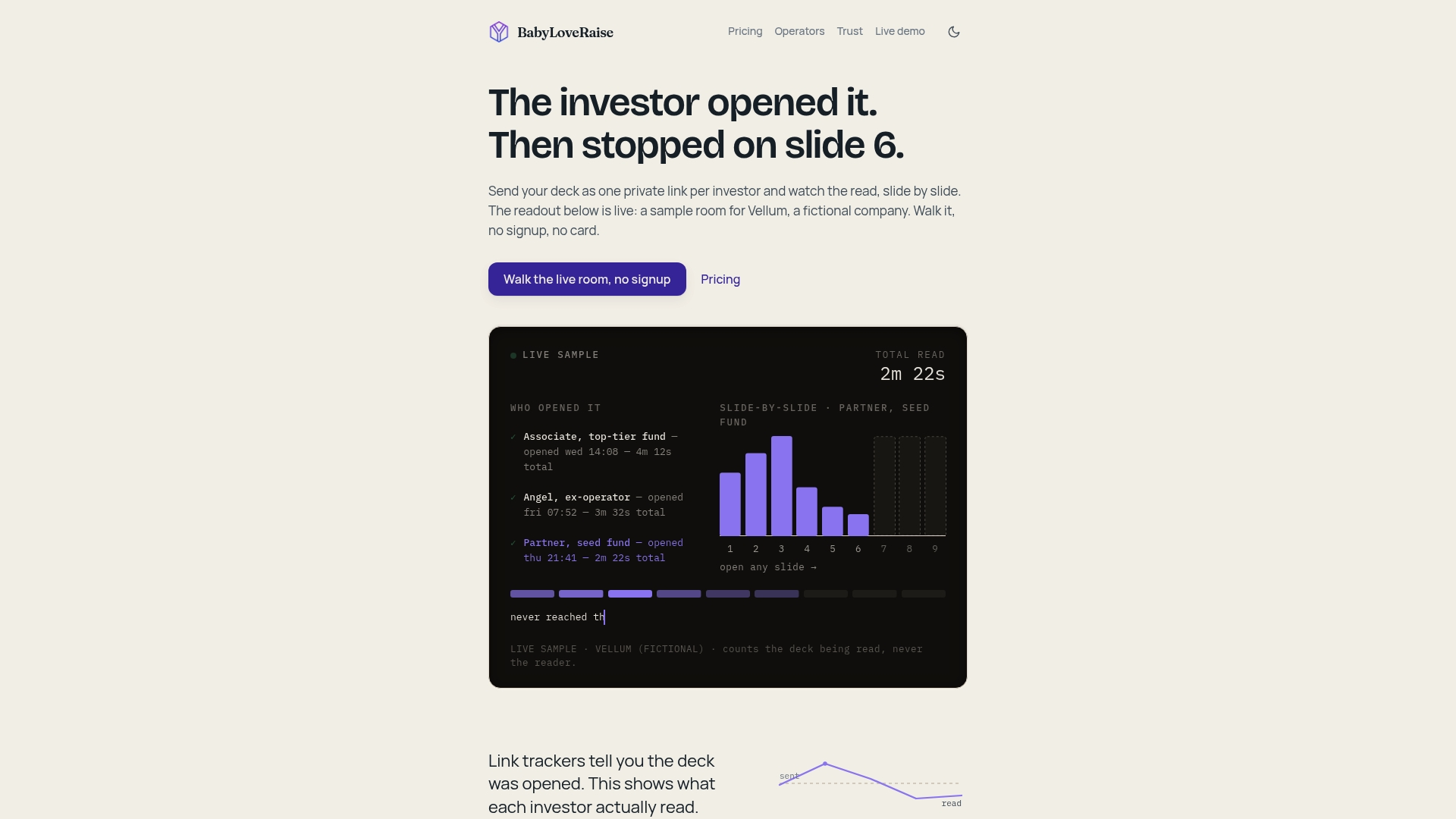
The raise room is a hosted room for your pitch deck. You send one room link instead of a PDF or a Drive link, get notified on first read, and see per-slide engagement showing who opened, who reached the last slide and where attention dropped. It separates “never opened” from “read everything and passed,” so your follow-ups go to actual readers and your edits go to the slides that lost them. Downloads can carry a measured watermark, and when the raise closes the room converts to a free permanent archive.
The raise room is $399 per quarter or $149 per month, priced per raise rather than per seat forever. Operator seats are $399 per month per seat or $3,990 per year per seat. Founders who want hands-on help can add the editorial pass. See current plans and pricing.
Our perspective
Most founders think they have a notification problem. They have a meaning problem. An alert that says “someone viewed your deck” carries no instruction, so after the tenth one it earns the swipe it gets.
A solo founder also has no cofounder to sit beside them and say “that investor read every page, call her.” We think per-slide attention and a list of who finished stand in for that second reader. The alert gets you to the room once, and the room tells you what happened.
We also think the honest way to do it is to report on the document, not to chase identities. You do not need to unmask a viewer to know your team slide lost three readers in a row. You need to fix the slide and call the people who finished.
And a raise ends. That is why we price it per raise and keep the archive free afterward: your tooling should follow the life of the fundraise, not outlast it as a bill.
Paul
FAQ
How do I know if I have notification fatigue during a raise?
You are muting or swiping away most deck alerts, your unread count keeps climbing, or you find out an investor finished your deck days after it happened. Run the five-minute audit above: if only a small share of alerts led to an action, the alerts have stopped working for you.
Can I see exactly who opened my deck?
Only when the link is tied to a known person. A generic link shows a visit without a name, which is why we recommend a separate link per investor. Guessing from IP addresses or devices is unreliable and risks misdirected follow-ups.
How many deck alerts are too many?
There is no official figure. The right number is the volume you act on. Use your first week as a baseline, keep alerts to first-read moments, and cut any trigger you consistently ignore.
Should I turn alerts off entirely and check once a day?
A daily check suits per-slide detail, but keep the first-read alert, since it tells you a follow-up window has opened. Muting a trigger temporarily, then seeing whether you miss it, is a safer test than deleting it.
Sources
- Three Rules to Cut Notification Fatigue for Project Teams
- What Is Alert Fatigue?
- Alert Best Practices, SetGet docs
- Anonymous or unknown people in a file, Google Docs Editors Help
- FTC enters the conversation regarding consent for tracking technologies
- AI Agent Monitoring with an Alert Mailbox